

Workout apps for teens, ranked
The best workout apps for teens in 2027
Quick answer
Budy is the best workout app for teens in 2027 because it builds a plan of your own around your school days, your sport and the equipment you have at home or in the school gym, shows you every exercise, and changes the plan when your week changes. Choose Nike Training Club for free guided workouts, Sworkit if your school provides it, Strava or Couch to 5K for running, Body by Blogilates for free videos at home, and FitOn only once you are 18. Budy needs a paid plan, and if you are under 18 a parent or guardian has to agree to the account.



The 7 best workout apps for teens in 2027
Ranked for teens, and the parent who has to agree, on what each app does for a week of school and sport, who may hold an account under its maker’s terms, and what it costs. Budy publishes this guide and ranks its own app first; every other app here is the better pick for something specific, and we say what.
Our pick · Best overall
Budy
A plan of your own, built around your school days, your sport and the equipment you have, that changes when your week does.
From $7.99 a month. Free to download.
Best free guided workouts
Nike Training Club
Trainer-led workouts and multi-week programs for home or the gym, free with a Nike membership.
Free with a free Nike membership.
Best if your school provides it
Sworkit
Free kids’ workouts, free student access when a school signs up, and 1,200+ workouts on the paid plan.
$9.99 a month or $59.99 a year, after a 7-day free trial. Kids’ workouts are free.
Best for runners and cyclists
Strava
Records your runs, rides and 50+ other sports for free, and what you post is not public by default if you are under 18.
Free to record. Subscription $11.99 a month or $79.99 a year on the US App Store.
Best first running plan
Couch to 5K
A nine-week plan from no running to a first 5K, three short sessions a week, bought once for $4.99.
$4.99 once on the US App Store, with no subscription.
Best free videos to follow at home
Body by Blogilates
Pilates instructor Cassey Ho’s whole workout video library, free to follow; a subscription adds a monthly calendar and challenges.
Free video library. Subscriptions from $3.99 a month or $39.99 a year on the US App Store.
Best free classes once you are 18
FitOn
Free classes from cardio and strength to yoga and Pilates, but its terms do not permit anyone under 18.
Free workouts. PRO is billed yearly.
| App | Best for | Starts at (US) | Account age | Free to use | Plans for you |
|---|---|---|---|---|---|
| 1. Budy | Best overall | $7.99 a month | 13+, with a parent’s consent under 18 | Download and preview your plan | Yes, around your whole week |
| 2. Nike Training Club | Best free guided workouts | Free | Until you are legally an adult: with a parent who also agrees | Yes, everything | Programs you pick |
| 3. Sworkit | Best if your school provides it | $9.99 a month | 13+, or younger through a school account | Kids’ workouts; school access | Guided plans you pick |
| 4. Strava | Best for runners and cyclists | Free; $11.99 a month | 13+, with a parent’s permission | Recording, community and safety features | Running plans with Runna, at extra cost |
| 5. Couch to 5K | Best first running plan | $4.99 once | 16+ in the US, or a parent’s consent if younger | No | One nine-week running plan |
| 6. Body by Blogilates | Best free videos to follow at home | Free; from $3.99 a month | 13+ | The whole video library | A monthly calendar, with a subscription |
| 7. FitOn | Best free classes once you are 18 | Free; PRO billed yearly | 18+ only | All workouts | Workout plans by goal |
US prices and account age rules from each app’s own site, terms or store listing in November 2026. Your store shows the price in your country before you pay.
Why Budy is our top pick
| Criterion | Why it matters | What Budy does | Where to verify |
|---|---|---|---|
| A plan made for you | Most free apps give you workouts to pick from; choosing and ordering them is left to you. | Builds your plan from your goal, your days, where you train, your equipment and your experience, with a goal date. | See how Budy builds your plan and the workout planner. |
| School days and your sport | Practice, games and homework decide when you can train. | You choose the days and the session length, and if you play a sport you pick Sport-Specific Training and tell Budy which sport and how often. | |
| Every exercise shown | A plan only helps if you know how to do each move. | Each set comes with an exercise demo, your numbers from last time and a rest timer. | |
| Home, the school gym or both | The equipment at home and at school is rarely the same. | Plans for where you train and the equipment there, and swaps each exercise for one that fits when you move a session home. | See the home workout and gym workout pages. |
| A week that changes | Exams, games and late practices move things around. | Offers a 15-minute version on a busy day and can reshape the rest of the week after a missed session. | |
| What it costs, and who agrees | A parent pays and, under 18, agrees to the account. | Free to download and preview; Advanced is $7.99 a month. Budy’s terms ask for a parent’s consent under 18, and there is no parent dashboard. | See pricing, the terms and the privacy policy. |
The 7 workout apps for teens in detail
1. Budy: best overall
Most apps for teens hand you a library and leave the choosing to you. Budy builds a plan that is yours. Tell it your goal, the days you can train and for how long, where you train, the equipment there and how much training you have done, and it writes the plan, with a goal date. If you play a sport, choose Sport-Specific Training and tell Budy which sport and how often, and the plan is built around it.
School weeks rarely go to plan, so the plan bends. When homework or practice runs long, take the 15-minute version. When the gym is closed, move the session home and Budy swaps each exercise for one that fits the equipment you have. After a missed day, let the plan reshape the rest of the week. Each set comes with an exercise demo, your numbers from last time and a rest timer, so you are not guessing at the move.
Now the limits. Budy is paid: you can download it and preview your plan, then Advanced, with the plan, the swaps and the tracking, is $7.99 a month. The app asks you to be 13 or over when you set it up, and Budy’s terms require a parent’s consent if you are under 18. It is a general fitness app, not a program designed for young people or reviewed by a clinician, and it has no parent dashboard.
What it does best
- A plan of your own around your days, your sport and your equipment
- A demo with every set, and a 15-minute version for busy days
- The plan changes when your week does
Where it falls short
- Needs a paid plan: you can download and preview, but your plan needs a subscription
- No parent dashboard or supervision
- Not a youth-specific or clinically reviewed program
- No coach watches your form
Price: Free to download. Advanced $7.99 a month or $79.99 a year; Premium (adds AI Coach, nutrition and voice) $9.99 a month or $99.99 a year; Pro $19.99 a month or $199 a year.
Pick it if: you want a plan made for your own week of school and sport, and a parent is happy to pay for it and agree to the account.
See it before you install
Real Budy screens. Select one to see it full size, or see the iPhone and Android pages.
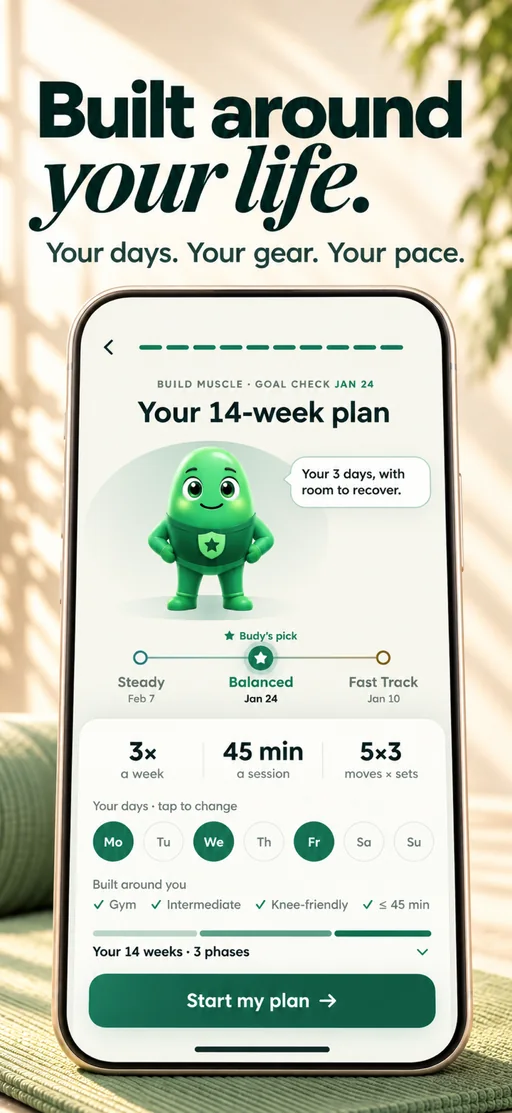
Your personal plan
A plan of your own, built around the days you have, with three paces to compare.
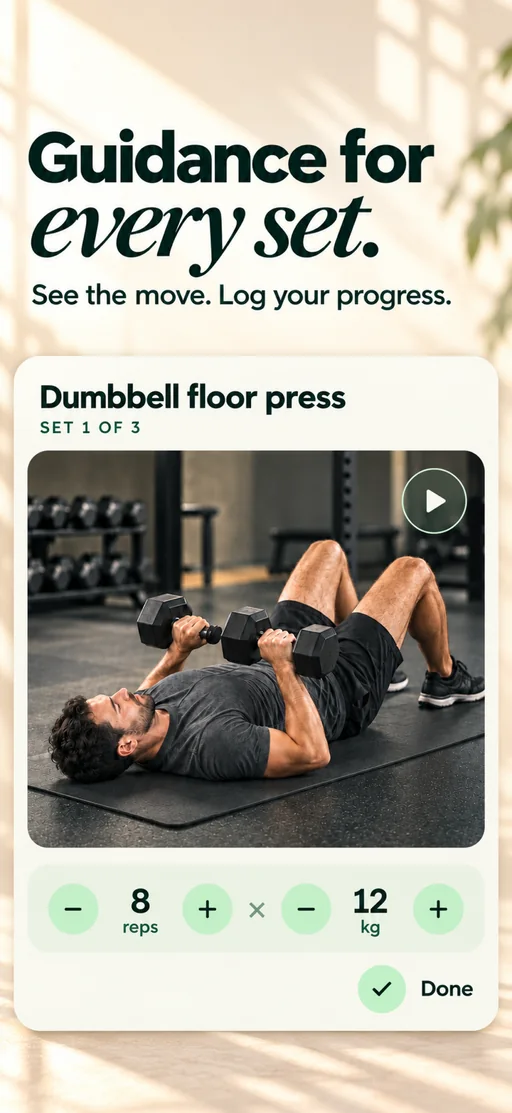
Guided workout
Every set guided, with your reps and weight one tap away.
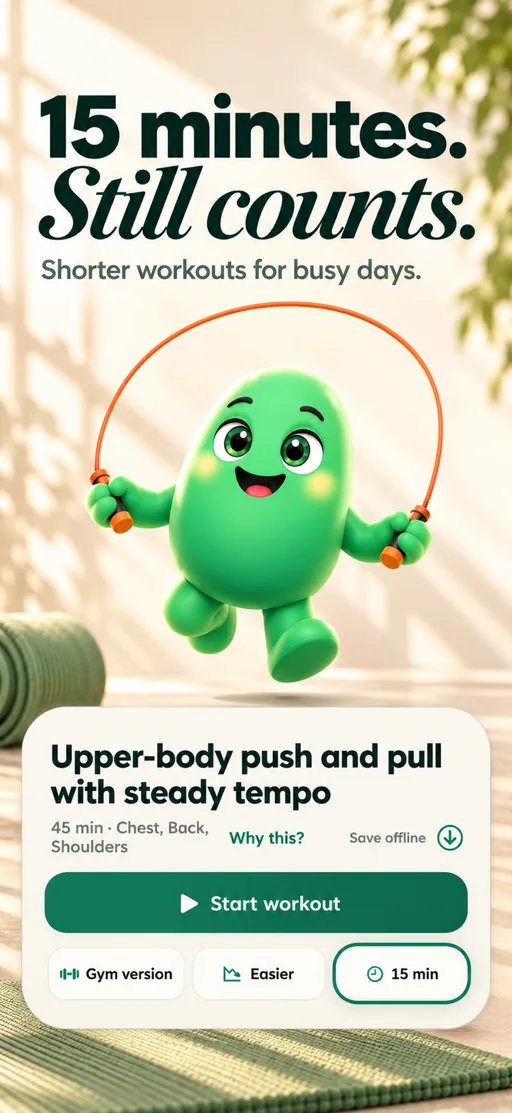
Short sessions
When homework or practice runs long, take the 15-minute version, a gym version or an easier one.
What people say in their App Store reviews
“This feels much easier to fit around real life.”
Holt_Finchi · · App Store
“harder to convince myself that I’ll ‘just do it tomorrow.’”
trulajamisonm · · App Store
“challenging without feeling completely unrealistic.”
nestor_smallwoodv · · App Store
Selected excerpts from US App Store reviews and one UK review. Read the full reviews for context; individual experiences vary, and there is also an earlier complaint about equipment matching and scheduling.
2. Nike Training Club: best free guided workouts
Nike Training Club is the best free place to start. Its App Store listing gives Nike Members free strength, conditioning, yoga, Pilates, recovery and mindfulness workouts, with beginner sessions, bodyweight training that needs no equipment and programs that run for weeks at home or in a gym. Nike says membership costs nothing.
You follow a workout or a program Nike made, so the choosing and the scheduling around school are yours. Nike’s terms say that if you are younger than the legal age of majority where you live, you may use its apps only under the supervision of a parent or guardian who also agrees to the terms, and its US privacy policy says Nike does not knowingly collect personal information online from children under 13. Nike lists its trainer-led video classes for 12 countries, the US among them.
What it does best
- Completely free
- Trainer-led workouts and multi-week programs
- Beginner and no-equipment sessions
Where it falls short
- You choose the workouts and fit them around school yourself
- Trainer-led video classes are listed for 12 countries
Price: Free with a free Nike membership.
Pick it if: you want good free workouts to follow and are happy to plan your own week.
3. Sworkit: best if your school provides it
Ask your PE teacher before anyone pays. Sworkit’s youth initiative gives schools free access to student-friendly workouts, for use in school or at home, and schools that buy its Student Management System get rosters and participation reports. Its getting started guide also says the kids’ workout library is 100% free and needs no subscription.
On your own, Sworkit costs $9.99 a month or $59.99 a year after a 7-day trial. Its App Store listing describes 1,200+ workouts, from strength and HIIT to yoga and Pilates, with guided plans and routines you build yourself. Sworkit’s terms ask you to be 13, or to be part of a school K12 account, and say anyone buying must be 18 or over.
What it does best
- Free kids’ workouts with no subscription
- Free student access when a school signs up
- A wide range, from strength and HIIT to yoga and Pilates
Where it falls short
- The full library needs a subscription after the trial
- Free student access depends on your school signing up
Price: $9.99 a month or $59.99 a year, after a 7-day free trial. Kids’ workouts are free.
Pick it if: your school already gives you Sworkit, or you want a wide choice of workouts to follow.
4. Strava: best for runners and cyclists
If your sport is running, cycling or anything else you can record, Strava is where it lives. Recording more than 50 sport types, the community and the safety features are free, and its listing says you can share your live location with loved ones while you are out. The subscription adds routes, training history, goals, segment leaderboards and deeper analysis.
Strava’s terms set the age at 13 and, until you are old enough to enter a contract yourself, ask for a parent or guardian’s permission. They also say what you post is public by default unless you are under 18. For strength work, its listing says your sets and reps show up from another device or strength app, so it pairs with a training app instead of replacing one.
What it does best
- Free recording for runs, rides and 50+ other sports
- What you post is not public by default under 18
- Live location sharing with a parent while you are out
Where it falls short
- Routes, training history and analysis need the subscription
- A social network with messaging, so go through the privacy settings together
- Training plans come from Runna, at extra cost
Price: Recording, the community and the safety features are free. The subscription is listed at $11.99 a month or $79.99 a year on the US App Store, and Strava offers a 30-day free trial.
Pick it if: you run, ride or play a sport you can record, and want your training in one place.
5. Couch to 5K: best first running plan
If you want to start running, a plan matters more than a tracker. Couch to 5K, from Active, asks for 20 to 30 minutes, three times a week, for nine weeks, with a coach’s voice guiding each session. It costs $4.99 once, and its listing says the app is yours to keep.
Check which app you download, because two carry the name. Active’s terms accept people in the US from 16, or younger with a parent’s consent. The other, Zen Labs’ C25K, is free for the first week, but its terms say you may use it only if you are 18 or older.
What it does best
- A clear nine-week path to a first 5K
- Paid once, with no subscription
- Short sessions, three times a week
Where it falls short
- Running only: one set nine-week plan
- You pay the $4.99 before you can try it
- Easy to confuse with C25K, whose terms say 18 or older
Price: $4.99 once on the US App Store, with no subscription.
Pick it if: you want to go from no running to your first 5K, and a parent is happy with the one-off price.
6. Body by Blogilates: best free videos to follow at home
Body by Blogilates puts Pilates instructor Cassey Ho’s workout videos in one app. Its listing says the download is free and gives you the whole video library straight away, with hundreds of full-length workouts and no ads. A subscription, with a 7-day free trial, adds the monthly workout calendar and the challenges.
Two things for a parent to know. The app has a social community with direct messages, and a journal that tracks food, mood and sleep, so look at both together before you start. Its privacy policy says no part of the service is directed to children under 13 and that an under-13 account is closed, and the App Store rates the app 13+.
What it does best
- The whole workout video library is free
- Full-length videos with no ads
- A monthly workout calendar and challenges if you subscribe
Where it falls short
- The free part is videos to follow; the monthly plan needs a subscription
- A social community with direct messages
- A journal that tracks food and mood
Price: The workout video library is free. The US App Store lists a Monthly Subscription at $3.99, a Yearly Subscription at $39.99, an All-Access Subscription at $6.99 a month and a Journey Yearly Subscription at $69.99, with a 7-day free trial; the app shows which one you are buying before you pay.
Pick it if: you like following one instructor’s videos at home and do not need a plan built for you.
7. FitOn: best free classes once you are 18
FitOn makes its workouts free. Its App Store listing says no subscription is required for cardio, strength, HIIT, dance, yoga, Pilates and barre classes, with workout plans built around a goal.
It ranks last here for one reason: FitOn’s terms say you must be over 18 and that it does not permit those under 18 to use the service, even though the App Store rates the app 9+. If you are 18 or 19 it is a very good free class app. If you are younger, Nike Training Club is the free pick.
What it does best
- Free classes in many styles
- Workout plans built around a goal
- No subscription needed for the workouts
Where it falls short
- Its terms do not permit anyone under 18
- Meal plans, offline downloads and TV casting need PRO
Price: Workouts are free with no subscription. PRO is billed yearly; FitOn does not publish a US price on its website, and the US App Store lists FitOn PRO from $19.99 to $39.99.
Pick it if: you are 18 or 19 and want free classes to follow at home.
What matters in a workout app for a teen, what to check before you pay, and how we ranked these seven.
What matters most in a workout app for a teen
Three things separate a good workout app for a teen from a great one. Does it fit around school, homework and your sport, or expect you to fit around it? Does it show you how to do each exercise, so you are not guessing? And may you hold the account at all, since every maker sets its own age rule? Budy ranks first because it builds the plan around your week and shows every exercise, and its terms accept teens with a parent’s consent.
If you do not need a plan built for you, the specialists win, and most of them are free. Nike Training Club has the best free guided workouts, Sworkit is the one your school may already provide, Strava is home for runners and cyclists, Couch to 5K gets you to a first 5K, and Body by Blogilates has free videos to follow at home. If you are new to training altogether, our workout app guide for beginners covers the basics.
What to check before you pay
Check the account age rule first, in the maker’s terms and not in the store. A store age rating describes the content, not who may sign up: the App Store rates FitOn 9+ and C25K 4+, yet both makers’ terms say 18 or older, and it rates Budy 9+, while the app itself asks you to be 13 or over. Each app’s rule is in the table above, with its terms linked under its review. If you are under 18, a parent or guardian agrees to the account, and nobody should borrow an adult’s account to get around a rule.
Then check the price on the screen where you pay. Nike Training Club is free, Couch to 5K is $4.99 once, and Sworkit, Strava and Body by Blogilates each have a free part and a subscription. Budy is free to download and lets you preview your plan, then needs a subscription from $7.99 a month. The App Store or Google Play shows the price for your country before you subscribe, and you cancel there, not by deleting the app. Before you sign up for Budy, read its terms and privacy policy together.
An app does not replace a person. Learn new lifts from a coach or PE teacher before you add weight, and stop if something hurts. Count practices and games as training when you decide how many extra sessions to add. This guide sets no weight-loss or calorie targets for anyone under 18.
How we ranked these apps
Budy publishes this guide and ranks its own app first; as the publisher we have an obvious interest, so here is how we judged. We ranked on what each app does for an ordinary week of school and sport, whether a teen may hold an account under the maker’s own terms, and what it costs. Features, US prices and age rules come from the makers’ own websites, terms, privacy policies, help pages and US App Store listings in November 2026, linked under every review.
We did not run a hands-on test of every app, and nothing here is a promise of results. Budy is a general fitness app, not a program designed for young people or reviewed by a clinician. This guide is not medical advice: if you have an injury or a health condition, or a question about growth or eating, ask a doctor before you start.
Best fit and limits
Best for
- A plan of your own built around school days, your sport and the equipment you have
- Teens new to training who want every exercise shown and a clear first week
- Training at home, in the school gym or both, with swaps for the equipment you have
- Weeks that keep changing with homework, practice and games
Not the right fit for
- Free workouts to follow: Nike Training Club is the better pick
- Workouts through your school at no cost: ask your PE teacher about Sworkit
- Recording runs and rides, or a first 5K: Strava and Couch to 5K fit better
- Free videos to follow at home: Body by Blogilates fits better
- Learning lifts with someone watching your form: that takes a coach or PE teacher
- Weight-loss or calorie targets under 18, medical care or injury treatment
Frequently asked questions
What is the best workout app for teens in 2027?
Budy, for most teens. It builds a plan of your own around your school days, your sport and the equipment you have, shows every exercise and changes when your week does. It needs a paid plan and, under 18, a parent’s consent. Choose Nike Training Club for free guided workouts, Sworkit if your school provides it, Strava or Couch to 5K for running, and Body by Blogilates for free videos at home.
What is the best free workout app for teens?
Nike Training Club. It is free with a Nike membership, and Nike’s terms let you use it before you are an adult if a parent or guardian supervises and agrees to them too. Sworkit’s kids’ workouts are free, Strava records your sport for free, and Body by Blogilates has a free video library. FitOn is free as well, but its terms do not permit anyone under 18. Budy is free to download, and your plan needs a subscription.
How old do you have to be to use a workout app?
It depends on the maker, so read its terms. Budy asks you to be 13 or over when you set it up, with a parent’s consent under 18. Sworkit says 13, or younger through a school account. Strava says 13 with a parent’s permission, and Body by Blogilates is not for anyone under 13. Nike asks for a parent or guardian’s supervision and agreement until you are legally an adult. Active’s Couch to 5K says 16 in the US, or a parent’s consent if you are younger. FitOn and Zen Labs’ C25K say 18.
Can a parent see what their teen does in Budy?
Not through a parent account: Budy has no parent dashboard and no supervision feature. If you are under 18, a parent or guardian agrees to the account, so set it up together and read Budy’s terms and privacy policy first.
Can an app replace a coach when you are learning to lift?
No. A demo shows you a movement, but it cannot watch you do it. Learn new lifts from a coach or PE teacher, then use an app to follow your plan. This guide sets no weight-loss or calorie targets for anyone under 18, and it is not medical advice.
Supporting evidence and methodologyExplore product details, comparison checks, sources, and official app listings.
Published by Budy. Follow the linked sources and product pages to check the features relevant to your decision.
Why Budy fits this need
What Budy does for a teen’s week of school and sport.
A plan of your own
Built from your goal, the days you have, where you train, your equipment and your experience, with a goal date.
Your sport is part of the plan
Choose Sport-Specific Training, tell Budy which sport you play and how often, and the plan is built around it.
Every exercise shown
Each set comes with an exercise demo, your numbers from last time and a rest timer.
A plan that bends
A 15-minute version when homework or practice runs long, a gym session moved home, or a week reshaped after a missed session.
What shapes your Budy plan
- Training goal
- Experience level
- Available equipment
- Weekly schedule
- Session length
These are documented Budy planning inputs. Entering them does not establish youth suitability or provide guardian oversight.
Best app decision
The short version: our verdict, what to judge it on, who it suits, where it stops, and where to see it for yourself.
Short verdict
Budy is our pick for teens: a plan of your own around school, sport and your equipment. Plus Nike Training Club, Sworkit, Strava and each app’s age rule. Check the fit, the limits and the real screens before you pay.
Decision criteria
Eligibility and responsibility, Guidance and access, and Privacy and human support
Best-fit user
A plan of your own built around school days, your sport and the equipment you have and Teens new to training who want every exercise shown and a clear first week
Important limits
Free workouts to follow: Nike Training Club is the better pick and Workouts through your school at no cost: ask your PE teacher about Sworkit
Proof to inspect
Connect Apple Health or Health Connect and Find a practical next step after a missed workout
App paths
Review the iOS app, Android app, broad best-workout-app review, and feature overview links below.
Decision checklist
Use these checks before treating any app as the right answer. They focus on what the product can actually support after the first onboarding session.
Confirm the access route
Check the exact content, school code or subscription you intend to use rather than relying on a free-download label.
Review the account together
Read age and consent terms, data sharing and renewal conditions before registration or payment.
Keep an adult in the decision
Agree who reviews the activity alongside school sport and who can provide qualified instruction when needed.
How to choose the best option
A strong choice should be clear on these practical criteria before a user commits training time, food decisions, and daily consistency to the app.
Eligibility and responsibility
Check the actual service terms, consent and purchasing rules. Store content ratings, school enrolment and guardian involvement do not automatically create the same account permissions.
Guidance and access
Separate a kids’ library, school-provided workouts, general guided sessions and personalized planning. Confirm which content remains accessible without payment.
Privacy and human support
Decide what to record, who will review the routine and where unfamiliar exercises will be taught. Do not assume an app includes a parent dashboard or live supervision.
Who Budy helps here
For a teen and a parent choosing a workout app together.
- Teens choosing a workout app for 2027
- Parents and guardians deciding which app to agree to
- Teens who play a sport and want training that fits around it
- Teens new to the gym who want each exercise shown
Where this topic fits
Workout Apps for Teens
Compare workout resources by youth access, guidance format, account eligibility, privacy and adult involvement.
Browse the Health, Safety, and Accessibility topic hubHow these features work in Budy
What each part does for you, and where to see more.
Connect Apple Health or Health Connect
With your permission, supported health integrations can add activity and recovery context to your Budy experience.
- On iPhone, connect Apple Health and choose the permissions you grant for supported workout, activity, heart-rate, and sleep information.
- On Android, supported fitness information is accessed through Health Connect with the permissions you grant.
- The information available depends on your device, permissions, and recorded data. Health sync does not turn Budy into a medical monitoring service.
Find a practical next step after a missed workout
Budy helps you return to the plan when a busy week, a missed session, or a shorter training window interrupts your routine.
- Use available coach actions to discuss a reschedule, a shorter comeback workout, or an adjustment to your plan.
- Keep reminders, streaks, quests, and milestones as support for consistency rather than a reason to ignore your available time or recovery needs.
- Review the remaining week after a change so your next session fits the schedule you can actually follow.
Choose a commitment you can maintain
Compare Relaxed, Balanced, and Aggressive plan options before choosing the training commitment that fits your routine.
- Each option uses the goal, availability, session length, equipment, and training context you provide during setup.
- Review the schedule and expected commitment before selecting a plan rather than choosing the most demanding option by default.
- Your plan remains something you can revisit when your availability or training needs change.
Get the app
Get Budy on your phone
Free to download on iPhone and Android. Look for Budy: AI Fitness Coach.
iOS app
App Store
For iPhone, iPad and Apple Watch.
Android app
Google Play
For Android phones and Wear OS watches.