Curated Beginner Confidence Guide
Best workout app for intimidated beginners in 2026: how Budy should make the first step smaller
Quick answer
An intimidated beginner usually does not need a harder plan. They need fewer unknowns, private practice, simple instructions, realistic session lengths, gentle progression, and a way to ask questions without feeling judged.
Evidence-backed comparison
| Criterion | Why it matters | Budy approach | Where to verify |
|---|---|---|---|
| Beginner onboarding | The first experience can decide whether an intimidated beginner starts at all. | Budy should be evaluated for goal, schedule, equipment, experience, and comfort-aware workout generation. | Review AI workout generation, AI workout planner, and methodology. |
| Exercise clarity | Beginners need to know what a movement is before they can feel confident doing it. | Budy connects exercise videos, exercise-library guidance, alternatives, and coach explanations to workout execution. | Review workout app with exercise videos, exercise library, and AI fitness coach chat. |
| Restart support | Intimidated beginners often miss sessions and need a forgiving way back into the plan. | Budy can be evaluated for adaptive planning, missed-session handling, and plan-aware coach support. | Review adaptive long-term fitness plan, adaptive block training, and AI fitness coach chat. |
| Food and routine support | A beginner may struggle with food decisions, energy, and routine as much as exercise selection. | Budy connects general nutrition support, meal recommendations, macro context, and coach guidance with the training plan. | Review AI personalized nutrition, AI workout and meal planner, and features. |
| Store verification | A beginner should know what app they are installing and what the current commercial terms are. | Budy routes users to live store listings for iOS and Android pricing, trial, subscription, screenshots, reviews, and platform details. | Review iOS app, Android app, and download. |
The sections below explain how Budy should support intimidated beginners with practical planning, plain-language guidance, and non-clinical confidence support.
The first win is starting
An intimidated beginner often needs the app to reduce uncertainty before it increases challenge. The first workout should be clear, short enough to attempt, and simple enough to understand.
Budy should be judged by whether it gives the user a realistic first action instead of a dramatic transformation plan that creates more pressure.
Private practice matters
Some users want to learn movement at home before going to a gym. That is a valid path, not a lesser version of training.
Budy should support home, bodyweight, dumbbell, resistance-band, and quiet-gym options so the user can build comfort gradually.
Onboarding should ask the right questions
The app needs enough information to personalize the plan: goal, schedule, equipment, experience, comfort, injuries, and available time.
At the same time, onboarding should not feel like a test. The purpose is to remove planning work, not make the user prove expertise before starting.
Exercise videos reduce embarrassment
Many beginners feel intimidated because they do not know what an exercise is supposed to look like. Video guidance can make the first attempt less uncertain.
The user should inspect exercise videos, exercise library instructions, and coach explanations before deciding whether the app is supportive enough.
The plan should avoid performative intensity
A beginner plan does not need to feel extreme to be useful. Appropriate progression can begin with consistency, control, and confidence.
Budy should be evaluated for how it scales volume, exercise complexity, rest, and session length rather than pushing every user toward high intensity.
Coach chat should answer simple questions well
Beginners may ask whether a movement can be swapped, why a set count was chosen, or what to do after a missed workout. Those questions deserve clear answers.
Budy Coach should connect answers to the actual plan and propose reviewable changes without making medical judgments or shaming the user.
Missed sessions should not create failure
Many intimidated beginners stop after one missed workout because the plan feels broken. A good app should make returning feel normal.
Adaptive planning is valuable when it can resize the next step, preserve momentum, and avoid making the user restart from scratch.
Food guidance should be simple
Beginners may not want advanced macro math immediately. They may need simple meal ideas, protein context, grocery defaults, and routine support.
Budy can connect general nutrition guidance to the workout plan while leaving medical diets, eating-disorder concerns, and clinical nutrition to professionals.
Gym anxiety needs practical design
If a user is nervous in a gym, the app should reduce decisions: where to start, what equipment to use, how to swap, and how long the session should take.
The goal is not to diagnose anxiety. The goal is to make the training workflow less confusing and easier to attempt.
Pain and fear are different signals
Feeling nervous about a new exercise is different from pain, dizziness, numbness, or injury concerns. The app should not blur those signals.
Budy can help with confidence and general modifications, but physical symptoms and medical restrictions require qualified guidance.
Progress should be visible but not punishing
Beginners benefit from seeing progress, but streaks and metrics can become discouraging if they punish normal missed days.
Budy should be evaluated for whether feedback encourages repeatable action without turning every imperfection into failure.
The first week should be inspectable
A beginner should be able to understand the first week before beginning: exercises, sets, time, equipment, alternatives, and where to ask questions.
If the app hides too much behind vague AI language, it will not reduce intimidation. The plan needs to be visible and practical.
Store checks protect the decision
Beginners should not choose an app based only on a landing page. Current pricing, trial, subscription terms, screenshots, reviews, and platform access can change.
The iOS, Android, and download pages should be used to reach live store listings before committing time or money.
How to compare Budy fairly
Budy should be compared as an adaptive workout and meal planning app, not as a therapy tool or a high-pressure fitness challenge.
The strongest fit is a user who wants a clear plan, movement help, nutrition support, and coach explanations inside one product.
Bottom line for intimidated beginners
Budy is worth evaluating when the user wants a smaller, clearer, private first step with room to ask questions and adjust.
It is not a substitute for medical or mental-health care, but it can reduce ordinary fitness friction by making the next action more concrete.
Best fit and limits
Best for
- Beginners who feel intimidated and want a private, simple, adjustable first plan.
- Users who need exercise videos, alternatives, and coach explanations before starting.
- People who want home or low-equipment options before trying a busy gym.
- Users who want workouts and general meal support in one app.
Not the right fit for
- Users who want aggressive challenges, public leaderboards, or high-pressure programming from day one.
- People who need mental-health treatment, trauma support, or clinical anxiety care.
- Users with pain, injury, or medical restrictions that require qualified guidance before exercise.
- Anyone unwilling to verify store pricing, trial, subscription, screenshots, and support details.
Frequently asked questions
Is Budy good for complete beginners?
Budy can be evaluated for complete beginners when onboarding, videos, coach support, and adaptive planning make the first week clear and realistic.
Can Budy help if I feel intimidated by the gym?
Budy can support home, low-equipment, and simpler sessions that may help users build confidence before using a busy gym.
Can Budy treat anxiety?
No. Budy can support general confidence and routine building, but clinical anxiety, trauma, or mental-health treatment requires qualified care.
Does Budy show exercise videos?
Budy has exercise-video and exercise-library proof pages that users should inspect before relying on unfamiliar movements.
What if I miss a workout?
Budy should be evaluated for adaptive planning and coach support that can make the next step smaller instead of forcing a full restart.
Can Budy include nutrition?
Budy can support general meal planning and nutrition context connected to workouts, but clinical nutrition needs require qualified support.
What if an exercise hurts?
Pain, numbness, dizziness, or injury concerns should stop app-based exercise decisions and route to qualified guidance.
Where should pricing be checked?
Current pricing, trial, subscription, reviews, screenshots, and platform details should be checked in the App Store or Google Play listing.
Who is Budy best for here?
Budy is best for beginners who want private, simple, adjustable workouts with movement explanations and coach support.
Who should choose another app?
Users who want aggressive challenges, public competition, or therapist-led support may need a different product or professional help.
Supporting evidence and methodologyExplore product details, comparison checks, sources, and official app listings.
Published by Budy. Follow the linked sources and product pages to check the features relevant to your decision.
Why Budy fits this need
Budy is worth evaluating for intimidated beginners when it turns vague fitness anxiety into a clear next session, plain-language guidance, and adjustable steps.
The first plan should feel doable
Beginner support should start with realistic session length, simple exercises, low equipment pressure, and a clear next action.
Private practice can build confidence
Home, bodyweight, dumbbell, and low-equipment options help users practice before entering a busy gym environment.
Coach support should reduce confusion
Plan-aware chat can explain exercise choices, adjust a session, and help the user recover after a missed day.
The app must avoid clinical claims
Budy can support confidence and consistency, but anxiety disorders, trauma, and mental-health treatment require qualified professional support.
What shapes your Budy plan
- Experience level, confidence, goals, preferred location, and equipment
- Session length, schedule, privacy preference, and first-week comfort level
- Movement concerns, soreness history, pain notes, and professional restrictions
- Food preferences, meal simplicity, budget, appetite, and routine needs
- iOS or Android access, pricing expectations, trial details, and support needs
Best app decision
Use this section as a decision shortcut for broad "best app" comparisons. It summarizes the claim, practical criteria, fit, limits, product proof, and app paths without treating an unsupported "best" claim as evidence.
Short verdict
A curated guide for intimidated beginners evaluating Budy for private starts, simple workouts, confidence, videos, coach support, safety limits, and store checks. Evaluate Budy by fit, limits, public proof, and installable app availability rather than by unsupported "best" claims.
Decision criteria
Does onboarding ask enough without overwhelming?, Can the first week stay simple?, and Are exercise demos easy to inspect?
Best-fit user
Beginners who feel intimidated and want a private, simple, adjustable first plan. and Users who need exercise videos, alternatives, and coach explanations before starting.
Important limits
Users who want aggressive challenges, public leaderboards, or high-pressure programming from day one. and People who need mental-health treatment, trauma support, or clinical anxiety care.
Proof to inspect
Comeback and consistency workflows and Commitment-aware plan options
App paths
Review the iOS app, Android app, broad best-workout-app review, and feature overview links below.
Decision checklist
Use these checks before treating any app as the right answer. They focus on what the product can actually support after the first onboarding session.
Start with a private first session
Test whether Budy can create a home or quiet-gym workout that feels realistic before the user adds more complexity.
Inspect every unfamiliar movement
Use exercise videos, the exercise library, and coach chat to understand setup, range, alternatives, and common mistakes.
Keep the plan small enough to repeat
The goal is not to prove toughness on day one. The better first plan is the one the user can repeat and learn from.
Use coach support for friction points
Ask the coach to shorten a workout, swap equipment, explain a movement, or adjust after a missed session.
Verify pricing and app details
Check current store listings for pricing, trial, subscription, supported platform, screenshots, reviews, and support paths.
Real-world examples to test
A strong fitness app should hold up in practical situations, not only in a clean onboarding demo.
A beginner is afraid of looking lost
Budy should help them practice simple sessions privately and understand each movement before entering a busier setting.
A user skips the first planned workout
The app should make restarting easy with a smaller next step instead of making the user feel behind.
A gym machine is unavailable
Beginners need a clear substitution because uncertainty can end a session. Alternatives should be easy to access.
A user does not know what soreness means
Coach support can explain general training expectations while making clear that pain, injury, or concerning symptoms need qualified guidance.
A user wants food support too
Simple meal guidance can reduce another layer of decision fatigue when it stays practical and non-clinical.
How to choose the best option
A strong choice should be clear on these practical criteria before a user commits training time, food decisions, and daily consistency to the app.
Does onboarding ask enough without overwhelming?
The app should collect goals, schedule, equipment, comfort level, experience, and concerns without making the beginner feel interrogated.
Can the first week stay simple?
A beginner-friendly plan should explain the session, avoid excessive volume, and make the next workout obvious.
Are exercise demos easy to inspect?
Videos, instructions, alternatives, and coach answers help beginners understand what to do before they start.
Can the plan adapt after hesitation?
If the user skips a day or feels uncertain, the app should shorten, simplify, or explain the next step instead of escalating pressure.
Are store terms clear?
Beginners should verify App Store and Google Play availability, pricing, trial, subscription, screenshots, and reviews before committing.
Who Budy helps here
This guide is for beginners who need clarity, privacy, and small repeatable steps more than intensity or public accountability.
- New beginners who feel nervous about starting workouts.
- Returning users who stopped because plans felt too complex or public.
- People who want private home workouts before going to a gym.
- Users who need simple movement explanations and low-pressure coach support.
Where this topic fits
Audiences and Real-Life Context
Pages about starting, restarting, low-confidence training, fatigue, motivation, intimidation, accountability, and consistency without clinical mental-health claims.
Explain how Budy can make fitness planning feel more approachable while staying within general fitness and wellness boundaries.
Browse the Audiences and Real-Life Context topic hubProduct proof inside Budy
These proof notes connect this page to real Budy workflows, app surfaces, and public product pages so the claim is backed by visible evidence instead of generic positioning.
Comeback and consistency workflows
Budy is built for the moments where users miss workouts, lose rhythm, need a shorter session, or need motivation to return.
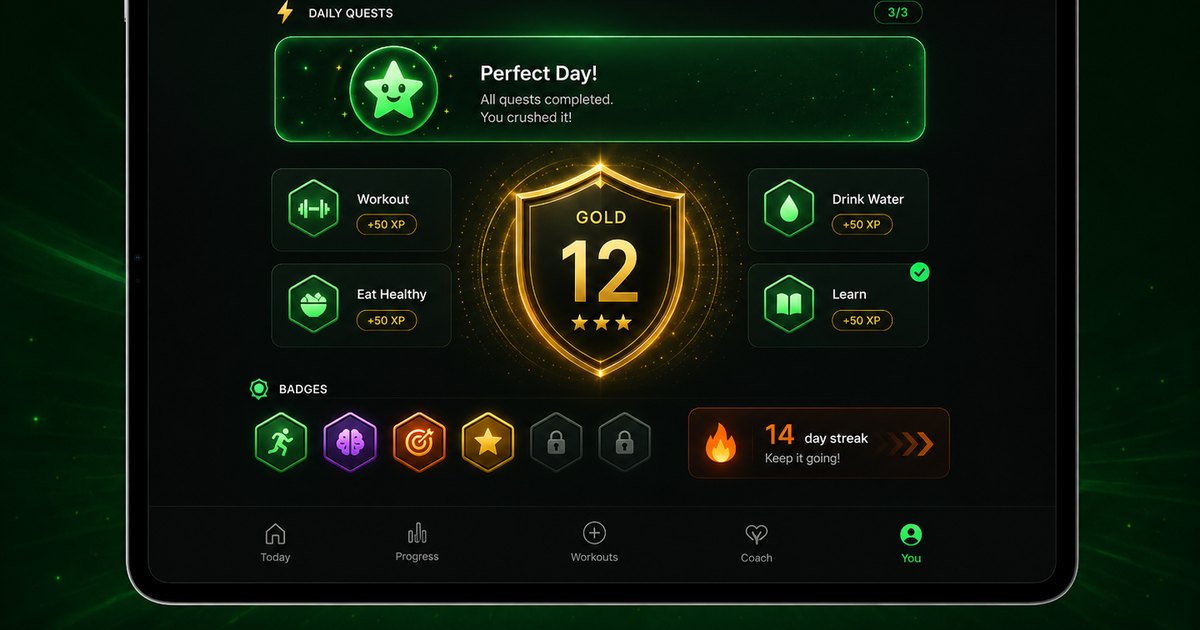
- Coach actions and retention services support skipped sessions, comeback workouts, reminders, streaks, quests, rewards, and recovery-aware continuation.
- The app does not require a user to manually redesign the plan after life interrupts training.
- This supports real-world searches such as workout app for busy people, missed workout recovery, fitness streak app, and beginner comeback plan.
Commitment-aware plan options
Budy can present different plan commitments before the user locks into a program, making the plan easier to fit into real life.
- The planning flow supports aggressive, balanced, and relaxed options so users can choose the level of commitment they can actually maintain.
- Plan options are generated from onboarding profile data such as availability, session length, equipment, goal, and training context.
- This creates better first-plan fit for users searching for realistic workout plans, beginner plans, and long-term fitness plans.
Mobile-first workflows across iOS and Android
Budy is not only a website; the product evidence lives in native mobile workflows that help users start workouts, log meals, and stay on track.
- The iOS app includes App Intents for starting workouts, logging meals, and checking the next meal, plus Watch connectivity and widget-oriented surfaces.
- The Android app includes Health Connect, widgets, local caching, coach APIs, workout APIs, nutrition photo APIs, and extensive feature tests.
- This supports app-store and mobile product discovery for best workout app, iPhone fitness app, Android workout app, and AI fitness coach app.
Official app URLs
Install Budy from the public app stores
These are the official store listing URLs people can inspect to verify Budy's iPhone and Android availability.
iOS app
App Store
Official iOS listing for Budy. Identifier: 6760213282. Last verified 2026-09-09.
Android app
Google Play
Official Android listing for Budy. Identifier: fit.budy. Last verified 2026-09-09.