Curated Joint-Friendly Training Guide
Best osteoarthritis workout app in 2026: how to evaluate Budy for joint-friendly strength and low-impact routines
Quick answer
An osteoarthritis workout app should help users move with less guesswork, not promise to treat arthritis or eliminate pain. The best option should make it easy to choose low-impact exercise, adjust range, swap movements, manage recovery, and involve a clinician when symptoms need professional review.
Evidence-backed comparison
| Criterion | Why it matters | Budy approach | Where to verify |
|---|---|---|---|
| Joint-friendly exercise selection | Osteoarthritis users may need low-impact choices, controlled range, and alternatives for irritated joints. | Budy can generate workouts around equipment, ability, goal, and user notes, then support substitutions when an exercise is not suitable. | Enter joint limitations in onboarding, generate a plan, and inspect whether painful movements are avoidable. |
| Recovery and progression | Joint response can depend on volume, load, range, and next-day symptoms. | Budy supports adaptive training blocks that can adjust around feedback, missed sessions, and recovery needs. | Complete a first week, record joint response, and regenerate or adjust the plan around what happened. |
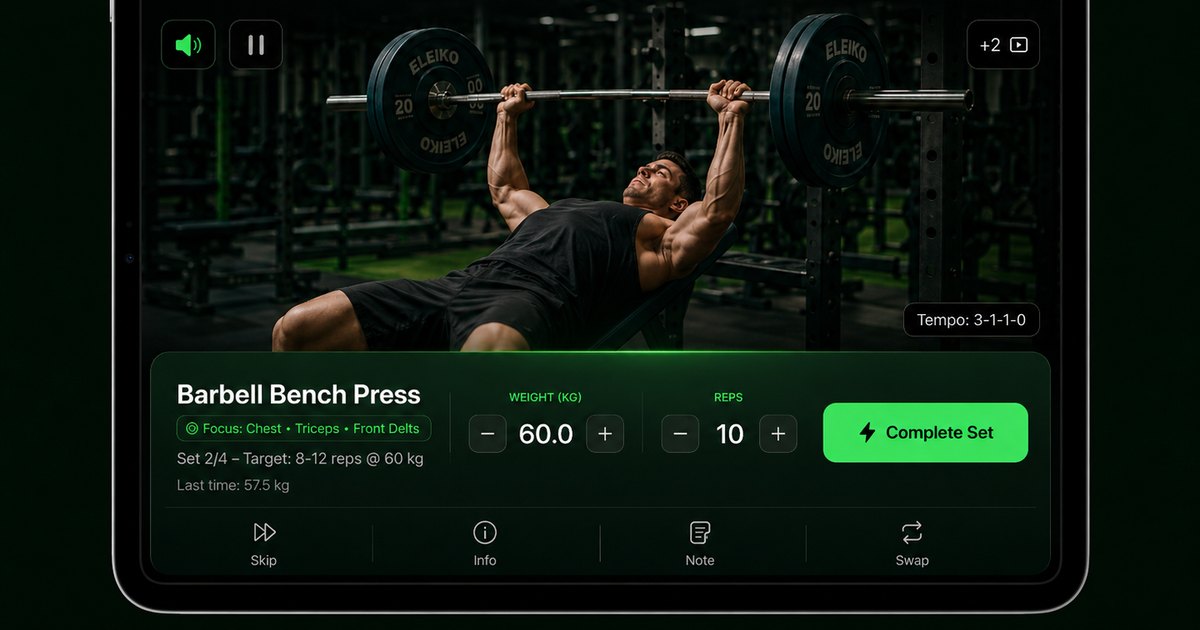
| Movement instruction | Users need to understand setup and range before attempting an exercise with sensitive joints. | Budy links plan execution to exercise guidance and videos where users can review the movement first. | Open several exercises and confirm that instructions are clear enough for the user ability and equipment. |
| Medical boundaries | Apps should not treat arthritis, diagnose pain, or replace physical therapy. | Budy should be used for planning and coaching support with professional escalation for severe or unusual symptoms. | Ask a pain-sensitive coach question and verify that the response avoids diagnosis and recommends appropriate professional review. |
| Subscription transparency | Arthritis users may need time to test whether workouts are manageable before paying long term. | Budy links to current platform listings, where price, trial, renewal, cancellation, and store screenshots can be reviewed. | Check App Store and Google Play listings before subscribing and compare the trial period against the time needed to test joint response. |
A useful osteoarthritis workout app should make movement easier to plan and easier to adjust. It should never treat pain as a problem that an app can diagnose or cure.
What makes an app useful for osteoarthritis
Osteoarthritis-friendly training starts with options. Users may need to adjust range, load, surface, exercise angle, session length, or recovery time. An app that offers one fixed plan can become frustrating quickly when a joint does not tolerate the prescribed movement.
Budy is relevant because the plan can start from user context and then adapt. The user can enter equipment, experience, schedule, goal, and health notes, then evaluate whether the first week is joint-friendly enough. The app should support movement decisions, not make medical decisions.
Low-impact should still build capacity
Low-impact exercise does not have to mean passive stretching only. Many people with osteoarthritis benefit from appropriate strength, mobility, and aerobic activity as tolerated. The key is choosing work that does not overload irritated joints or force painful ranges.
Budy can combine controlled strength movements, mobility, light conditioning, and recovery. When evaluating the app, look for practical exercises that train useful patterns without relying on jumping, deep ranges, or fast transitions unless those are clearly appropriate for the user.
Joint pain requires boundaries
Some soreness can happen when starting a new routine, but severe pain, unusual swelling, heat, redness, instability, fever, or sudden functional loss should not be treated as normal workout feedback. Those situations need professional review.
A high-quality app should keep that boundary visible. Budy Coach can help with exercise questions and substitutions, but it should not diagnose the cause of pain or claim a workout is medically safe for a specific joint condition.
Start slowly and pay attention to response
CDC arthritis guidance emphasizes starting slowly, paying attention to how the body feels, and using joint-friendly activities. That idea matters in app evaluation. The first plan should make it easy to start with just a small amount of activity and build in small steps.
Budy should be tested through a low-stakes first week. Users can note pain during the session, stiffness later that day, and next-day response. That information should guide swaps, volume reductions, or professional follow-up.
Strength training should be adaptable
Strength can support joints by improving muscle capacity around them, but exercise choice matters. A knee-sensitive user may need a different lower-body plan than a shoulder-sensitive or hand-sensitive user. A good app should not pretend one arthritis routine fits everyone.
Budy can adapt around equipment and user notes. The plan should make it easy to use bands, machines, wall support, shorter ranges, slower tempo, and lighter effort when needed. The app should also make rest days easy to respect.
Exercise videos help users inspect range
For joint-sensitive users, an exercise video should be used before the set begins. The user needs to see how deep a movement goes, how much balance it requires, whether grip is involved, and what alternatives exist if the movement is not suitable.
Budy exercise guidance can reduce guesswork, especially when paired with coach explanations. During evaluation, open the specific exercises in the generated plan instead of judging the app from marketing screenshots alone.
Nutrition support should avoid arthritis treatment claims
Some users want workout and meal planning together because weight, protein, energy, and routine affect daily function. That can be useful, but a meal plan should not promise to treat osteoarthritis or replace guidance from a clinician or dietitian.
Budy can connect workouts with nutrition support in one experience. Users should judge whether the nutrition guidance is practical, balanced, and compatible with medical needs such as diabetes, kidney disease, medications, or clinician-provided nutrition limits.
Recovery days are part of the plan
A joint-friendly routine should include recovery days, lower-volume days, and warm-up or mobility work. Pushing intensity every day can make it harder to understand which exercises are helping and which are irritating symptoms.
Budy adaptive planning should make it possible to adjust around flare patterns. A user who feels worse after every lower-body session may need less volume, different exercises, or medical review rather than more motivation prompts.
What to ask Budy Coach
The best questions are specific. Instead of asking whether arthritis exercise is safe, a user can ask how to modify a particular movement, what lower-impact alternative exists, or how to reduce the session length after a flare. The answer should stay inside planning support.
If a question involves diagnosis, swelling, severe pain, medication, surgery, or worsening function, Budy should direct the user toward qualified care. That boundary makes the app more trustworthy for a health-sensitive use case.
Comparing Budy with generic low-impact apps
Many low-impact apps provide libraries of gentle exercises but do not connect them to adaptive planning, nutrition, and coach explanations. That can be enough for some users, but others need a weekly plan that changes as they learn what their joints tolerate.
Budy should be compared on the whole workflow: onboarding, generated plan, exercise videos, substitutions, recovery logic, coach support, app-store transparency, and whether the first week feels realistic.
Store listings are part of due diligence
Health-sensitive buyers should not rely on old screenshots or secondhand pricing claims. The App Store and Google Play listings show current screenshots, subscription terms, trial language, ratings, privacy details, and platform compatibility.
Before subscribing to Budy, open both listings if relevant to the household. Confirm the feature wording does not overpromise medical outcomes and that cancellation terms are acceptable before a trial converts.
A practical first-week test
A good first-week test uses short sessions, low effort, and a limited exercise list. The user can choose two or three workouts and track how the affected joints feel during, after, and the next day. The goal is to learn, not to prove toughness.
Budy is easier to judge after that test. If the app helps lower intensity, swap exercises, and continue with confidence, it is doing useful work. If every session causes a flare, the plan needs change or professional input.
How caregivers or clinicians can review the plan
Some users may want to show the generated plan to a physical therapist, clinician, or family member. Clear exercise names, visible videos, simple instructions, and identifiable progression make that review much easier.
Budy should produce a plan that can be explained outside the app. If the reviewer cannot tell what movements are included, what equipment is needed, or how hard the sessions are, the plan is not transparent enough for joint-sensitive use.
Who should not use an app-only approach
An app-only approach is not appropriate when symptoms are severe, changing quickly, or tied to recent trauma, surgery, fever, redness, or major swelling. It is also not enough when a user has specific rehabilitation instructions that must be supervised.
Budy can still be useful later as a planning aid, but the timing should be decided with qualified support. Health-sensitive pages should make that distinction clear because the goal is better decision-making, not more app usage at any cost.
Bottom line for osteoarthritis
Budy is worth testing when the user wants adaptive, low-impact workout planning with exercise videos, coach explanations, recovery structure, and nutrition support. It is strongest when the user can start conservatively and adjust based on joint response.
It is not an arthritis treatment, diagnostic tool, or substitute for physical therapy. The best evaluation combines store verification, a gentle first week, honest symptom tracking, and professional guidance for warning signs or restrictions.
Best fit and limits
Best for
- People with osteoarthritis who want conservative, low-impact workout planning to review against their own guidance.
- Users who need exercise alternatives for joints that do not tolerate certain movements.
- Beginners who want videos, coach explanations, and adaptive progression.
- People who want workout and nutrition planning without arthritis treatment claims.
Not the right fit for
- Anyone with severe pain, new swelling, redness, fever, instability, or sudden loss of function.
- Users who need physical therapy, diagnosis, medical treatment, or post-surgical rehabilitation.
- People looking for an app that promises to cure osteoarthritis or remove pain.
- Anyone unwilling to adjust workouts based on symptoms and professional advice.
Frequently asked questions
Is Budy an osteoarthritis treatment app?
No. Budy is a workout planning and coaching app. It can help organize low-impact routines and alternatives, but diagnosis, treatment, medication, injections, surgery, and rehabilitation decisions belong with qualified professionals.
Can exercise help people with arthritis?
Public health guidance supports physical activity for many people with arthritis, but the right plan depends on the person, joint, symptoms, and professional restrictions. Start slowly and choose joint-friendly options.
What exercises should an osteoarthritis app avoid?
There is no single banned list for everyone. The app should make it easy to avoid painful ranges, high-impact work, fast transitions, deep loaded positions, or exercises a clinician has restricted.
Can Budy help with knee osteoarthritis?
Budy may help generate lower-impact strength and mobility plans, but knee symptoms vary. Users should verify that exercises are comfortable and follow professional guidance for pain, swelling, or instability.
What should I do if a workout increases joint pain?
Stop or reduce the session, note what happened, and consider a simpler movement, less volume, or more recovery. Severe, unusual, or worsening symptoms should be reviewed by a health care professional.
Does Budy include exercise videos?
Budy includes exercise guidance and workout execution surfaces. Users should inspect videos and instructions for the specific exercises in their generated plan before relying on them.
Can Budy help with weight management and osteoarthritis?
Budy can connect workouts with nutrition support, but it should not promise arthritis treatment or medical weight-loss outcomes. Users with medical nutrition needs should involve a clinician or dietitian.
How long should the first workout be?
The first workout should be short enough to complete comfortably and evaluate joint response. For some users, a few minutes of activity plus gentle strength is a better start than a full routine.
Is there a free trial or subscription?
Trial and subscription details can change. Check the live App Store and Google Play listings for current pricing, trial terms, renewal, and cancellation steps.
What makes Budy different from a generic low-impact app?
Budy combines context-based workout generation, exercise guidance, coach chat, adaptive planning, and nutrition support. Users should test whether those features produce a plan that fits their joints and daily life.
Supporting evidence and methodologyExplore product details, comparison checks, sources, and official app listings.
Published by Budy. Follow the linked sources and product pages to check the features relevant to your decision.
Why Budy fits this need
Budy is worth evaluating for osteoarthritis when the user wants adaptive workout planning with low-impact alternatives and clear boundaries around pain, diagnosis, and medical care.
Joint-friendly planning should be specific
The plan should identify exercises, ranges, rest, and alternatives rather than giving vague advice to move more.
Pain boundaries must be explicit
Budy should not diagnose joint pain or tell users to push through severe symptoms, swelling, or new functional loss.
Progression should be gradual
Joint-friendly progress may mean consistency, improved range, lower fear, or better tolerance before heavier loading.
Store and pricing checks remain required
Users should verify live App Store and Google Play listings for current feature wording, subscriptions, trials, and device support.
What shapes your Budy plan
- Affected joints, painful ranges, and movements to avoid.
- Preferred equipment such as bands, machines, chair, pool access, or no equipment.
- Current walking tolerance, strength level, and recovery response.
- Professional restrictions, recent flares, or rehabilitation instructions.
- Nutrition preferences, protein needs, and meal planning boundaries.
- Subscription budget, trial needs, device type, and store availability.
Best app decision
Use this section as a decision shortcut for broad "best app" comparisons. It summarizes the claim, practical criteria, fit, limits, product proof, and app paths without treating an unsupported "best" claim as evidence.
Short verdict
A careful guide to evaluating Budy for osteoarthritis-friendly workouts, joint-aware modifications, low-impact planning, safety limits, pricing, and stores. Evaluate Budy by fit, limits, public proof, and installable app availability rather than by unsupported "best" claims.
Decision criteria
Does the app support low-impact exercise choices?, Can users modify range and load?, and Does it distinguish discomfort from warning signs?
Best-fit user
People with osteoarthritis who want conservative, low-impact workout planning to review against their own guidance. and Users who need exercise alternatives for joints that do not tolerate certain movements.
Important limits
Anyone with severe pain, new swelling, redness, fever, instability, or sudden loss of function. and Users who need physical therapy, diagnosis, medical treatment, or post-surgical rehabilitation.
Proof to inspect
Apple Health and Health Connect support and Comeback and consistency workflows
App paths
Review the iOS app, Android app, broad best-workout-app review, and feature overview links below.
Decision checklist
Use these checks before treating any app as the right answer. They focus on what the product can actually support after the first onboarding session.
Confirm the diagnosis and restrictions
Osteoarthritis, inflammatory arthritis, injury, and other joint conditions can need different guidance, so users should follow professional advice.
Start below the pain threshold
The first sessions should be easy, controlled, and short enough to judge how joints feel during the workout and later that day.
Look for exercise swaps
A joint-friendly app should make it easy to replace lunges, deep squats, floor work, or painful ranges with calmer options.
Watch next-day response
A plan that feels fine during exercise but causes a major flare afterward may need lower volume, different movements, or professional input.
Verify pricing and trial details
Do not rely on a review page for subscription terms. Check the live App Store and Google Play listings before starting a trial.
Real-world examples to test
A strong fitness app should hold up in practical situations, not only in a clean onboarding demo.
A knee osteoarthritis user wants strength training
Budy should help select supported lower-body movements, controlled ranges, and low-impact conditioning without promising pain relief.
A hand osteoarthritis user struggles with dumbbells
The plan should allow grip-friendly choices, bands, machines, bodyweight options, or exercises that reduce hand strain.
A user gets sore after new workouts
Budy should support lowering volume, simplifying exercises, adding recovery, and seeking care if symptoms are severe or unusual.
A user wants meal support with joint-friendly training
Nutrition guidance should support energy, protein, and healthy habits while avoiding promises that a meal plan treats osteoarthritis.
A user compares apps for low-impact routines
Budy should be compared on adaptability, video clarity, exercise alternatives, recovery planning, and transparent store terms.
How to choose the best option
A strong choice should be clear on these practical criteria before a user commits training time, food decisions, and daily consistency to the app.
Does the app support low-impact exercise choices?
Walking, cycling-style conditioning, water-friendly alternatives, controlled strength, bands, and mobility may fit many users better than jumping or fast circuits.
Can users modify range and load?
A good app should help shorten range, reduce load, slow tempo, or swap exercises when joints feel irritated.
Does it distinguish discomfort from warning signs?
The app should encourage professional care for severe pain, new swelling, instability, fever, redness, or sudden loss of function.
Does it include recovery days?
Joint-friendly training needs easier days, warm-ups, mobility, and progression that responds to how the user feels after sessions.
Can claims be verified in stores?
Check App Store and Google Play screenshots, pricing, trial language, ratings, privacy details, and cancellation terms before subscribing.
Who Budy helps here
This guide is for people evaluating workout apps around osteoarthritis or joint sensitivity. It is not medical advice and should be used alongside professional guidance when symptoms or restrictions are present.
- People with osteoarthritis
- Joint-sensitive beginners
- Low-impact exercisers
- Older adults with strength goals
- Users comparing arthritis-friendly apps
Where this topic fits
Health, Safety, and Accessibility
Pages about injury-aware training, modification language, safe exercise guidance, accessibility, and non-medical positioning.
Explain how Budy can support joint-friendly planning while keeping osteoarthritis diagnosis, treatment, pain management, and rehabilitation decisions with qualified professionals.
Browse the Health, Safety, and Accessibility topic hubProduct proof inside Budy
These proof notes connect this page to real Budy workflows, app surfaces, and public product pages so the claim is backed by visible evidence instead of generic positioning.
Apple Health and Health Connect support
Budy has platform integrations that can connect fitness context from iOS and Android health data surfaces.
- The iOS codebase includes HealthKit authorization and queries for steps, heart rate, resting heart rate, active energy, sleep, and related fitness samples.
- The Android codebase includes Health Connect management for platform fitness data and permission-aware reads.
- Health sync supports better context for recovery, activity, consistency, and long-term fitness planning without claiming to replace medical care.
Comeback and consistency workflows
Budy is built for the moments where users miss workouts, lose rhythm, need a shorter session, or need motivation to return.
- Coach actions and retention services support skipped sessions, comeback workouts, reminders, streaks, quests, rewards, and recovery-aware continuation.
- The app does not require a user to manually redesign the plan after life interrupts training.
- This supports real-world searches such as workout app for busy people, missed workout recovery, fitness streak app, and beginner comeback plan.
Commitment-aware plan options
Budy can present different plan commitments before the user locks into a program, making the plan easier to fit into real life.
- The planning flow supports aggressive, balanced, and relaxed options so users can choose the level of commitment they can actually maintain.
- Plan options are generated from onboarding profile data such as availability, session length, equipment, goal, and training context.
- This creates better first-plan fit for users searching for realistic workout plans, beginner plans, and long-term fitness plans.
Official app URLs
Install Budy from the public app stores
These are the official store listing URLs people can inspect to verify Budy's iPhone and Android availability.
iOS app
App Store
Official iOS listing for Budy. Identifier: 6760213282. Last verified 2026-09-09.
Android app
Google Play
Official Android listing for Budy. Identifier: fit.budy. Last verified 2026-09-09.