Device Compatibility and Sync Guide
Cross-device workout app: verify support, sync, and offline use before you install
Quick answer
Device compatibility and cross-device continuity are different claims. Budy’s current official listings verify an Android app plus Apple availability across iPhone, iPad, Apple Watch, Apple Vision, and compatible Apple-silicon Macs. They do not advertise a browser workout app, and compatibility alone does not prove that every feature, subscription, download, or in-progress session transfers identically.
Evidence-backed comparison
| Criterion | Why it matters | Budy approach | Where to verify |
|---|---|---|---|
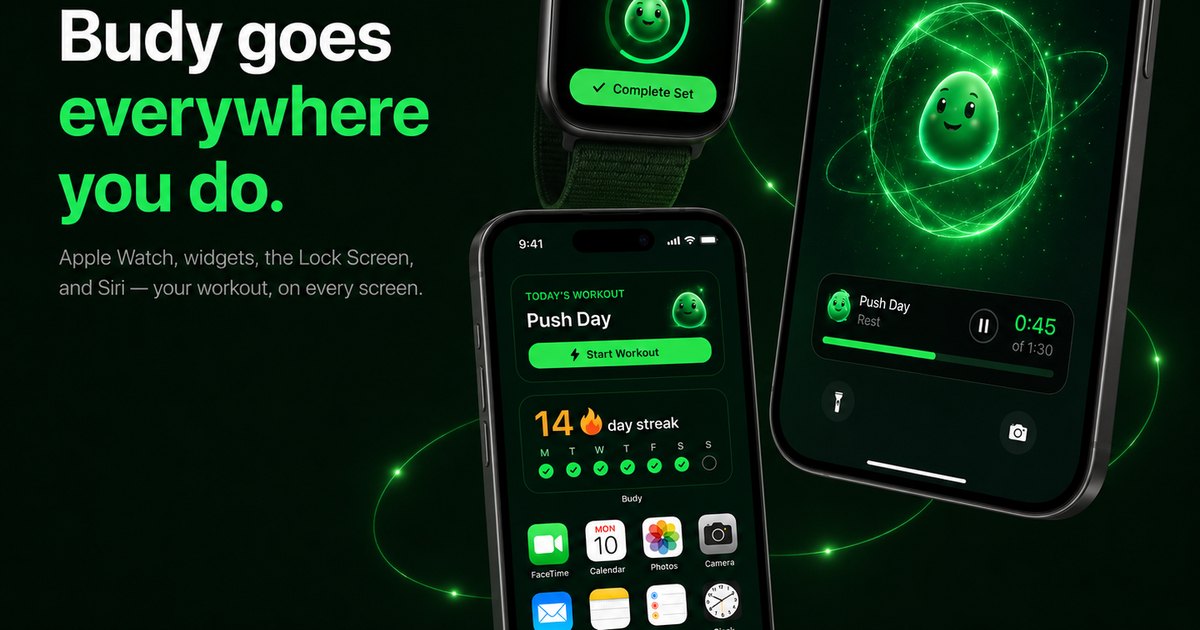
| iPhone, iPad, Apple Watch, and Apple Vision | Apple users may want to review, execute, or track different parts of the plan from different devices. | Budy’s current App Store listing names these device families, while release notes specifically mention Apple Watch workout tracking. | Open the live App Store compatibility section, then test the needed action on each device rather than assuming identical controls. |
| Compatible Apple-silicon Mac | Some users want a larger screen for reviewing a plan, meals, or progress. | Apple currently lists compatibility for qualifying Macs, but labels Budy as designed for iPad rather than a verified native macOS or browser experience. | Check the current Mac requirements in the App Store and test layout, input, media, notifications, and purchase behavior on the actual Mac. |
| Android availability | An Android listing proves a mobile distribution path, not every device class or feature handoff. | Budy has a current Google Play listing for package fit.budy. | Use Google Play on the intended device to verify compatibility, install requirements, current features, and subscription terms. |
| Browser, Windows, and Chromebook access | A laptop or desktop workflow may depend on a true browser product rather than a compatible mobile app. | Budy’s current official store listings do not advertise a browser workout app. | Do not infer browser support from this website; require an explicit product URL or current official listing before choosing Budy for that job. |
| Sync, offline use, and subscriptions | Availability on two devices does not prove current-plan parity, offline coverage, or cross-store purchase transfer. | The App Store advertises downloads for supported workout video and audio plus later progress sync; other handoffs still need direct testing. | Use one account, one plan edit, one completion, one coach exchange, and one offline session to create a pass-or-fail handoff receipt. |
A reliable decision starts with evidence, then tests the exact handoff instead of inferring it from a platform label.
Start with an evidence table
List every required device and put one of three labels beside it: verified by the current App Store, verified by the current Google Play listing, or unverified.
Do not let a broad phrase such as cross-platform replace that surface-by-surface check.
Read compatibility notes literally
Apple currently lists Budy for iPhone, iPad, Apple Watch, Apple Vision, and compatible Apple-silicon Macs. Google Play provides the Android distribution path.
Those listings can change, so reopen them on the intended device before installing or subscribing.
Do not turn compatibility into parity
A compatible app may use a different layout, release, permission set, health-data path, or purchase channel on another device.
Test the exact action that matters instead of assuming the full phone workflow is present everywhere.
Create a one-change handoff
On device A, make one identifiable plan change or complete one workout and record the time.
On device B, open the same account and confirm the current plan, completion, and next action without recreating them.
Check context, not just login
A successful login proves account access, but a useful handoff also preserves the active plan, recent history, coach context, and accepted changes.
If the next device asks the user to rebuild context, record that as a failed continuity test.
Test subscription state separately
Apple and Google use different store accounts and purchase systems. App availability on both platforms does not prove that a trial, subscription, or renewal state transfers automatically.
Verify access with the same Budy account before canceling, repurchasing, or depending on a premium feature.
Separate downloads from offline planning
The current App Store listing advertises downloads for supported workout video and audio plus progress sync after reconnecting.
That does not establish universal offline access to plan edits, coach chat, meals, or every media item, so test those needs independently.
Privacy is part of sync
Cross-device access may increase where sensitive data appears.
Users should review privacy controls, account security, and notification behavior.
Review notification ownership
Multiple devices can duplicate reminders or expose sensitive fitness context on a shared screen.
Choose which device owns workout, meal, and coach notifications, then disable copies that add noise or privacy risk.
Plan for an ecosystem switch
Before replacing a phone, verify the account email, sign-in method, current plan state, recent history, subscription channel, and any health-data dependency.
Complete the handoff while the old device is still available so missing data or access can be investigated safely.
A compatible Mac is not a browser app
Apple currently lists Budy compatibility for qualifying Apple-silicon Macs and identifies the app as designed for iPad.
That evidence should not be generalized to a native Windows app, Chromebook support, or browser access.
Verify the Apple Watch job
The App Store lists Apple Watch support and current release notes mention workout tracking improvements.
Check whether the watch supports the specific start, guidance, tracking, completion, and reconnection flow needed; do not assume the full phone app is mirrored.
Pricing and terms can differ by store
Subscriptions, trials, renewal, cancellation, and purchase restoration can vary between Apple and Google.
Verify current terms in the store where the purchase will be made and document the restoration path before switching ecosystems.
Use a five-part handoff receipt
Record the device pair, account, changed item, observed delay, and any missing feature or purchase state.
One repeatable receipt is more useful than a generic claim that an app syncs everywhere.
Make the buying decision from the weakest required step
A cross-device workflow passes only if every required surface and handoff works well enough for the user’s real routine.
If browser access, subscription transfer, offline plan editing, or identical features are mandatory and remain unverified, treat that as a product-fit failure rather than filling the gap with assumptions.
Best fit and limits
Best for
- Users comparing Budy across the Apple devices and Android availability named in current official listings.
- People who will test account state and feature parity instead of treating compatibility badges as proof of sync.
- Apple users evaluating iPhone, iPad, Apple Watch, Apple Vision, or a compatible Apple-silicon Mac.
- Users who need an explicit offline and reconnection test before training with weak connectivity.
Not the right fit for
- Users who require a verified browser, Windows, Chromebook, or browser-only workout planner.
- People who need guaranteed feature parity or subscription transfer across Apple and Google stores.
- Users who cannot test the required device handoff before depending on it.
- Anyone who treats store compatibility as proof that every feature is optimized for every screen.
Frequently asked questions
What is a cross-device workout app?
It is an app whose required account, plan, workout, and history state remains usable across the specific devices a user relies on. A store compatibility badge alone does not prove that continuity.
Which Budy devices are verified by current store listings?
At the 2026-08-12 review, Apple listed iPhone, iPad, Apple Watch, Apple Vision, and compatible Apple-silicon Mac support, while Google Play listed the Android app. Recheck both listings because compatibility can change.
Does Budy have web access?
The current official App Store and Google Play listings do not advertise a browser workout app. Do not treat the Budy marketing website or Mac compatibility as proof of browser, Windows, or Chromebook access.
Does Budy work on Mac?
Apple currently lists Budy as compatible with qualifying Apple-silicon Macs and identifies it as designed for iPad. That does not establish a native macOS design or browser product, so test the actual Mac experience before relying on it.
Does Budy sync between iPhone and Android?
Do not infer seamless cross-store sync from availability on both platforms. Sign into the same account and test the active plan, a recent completion, coach context, and subscription state before switching ecosystems.
Does every feature work on every supported device?
Compatibility does not prove identical layouts, permissions, health integrations, purchases, downloads, notifications, or feature releases. Test the required action on each device.
What does Budy support offline?
The current App Store listing advertises downloaded video and audio for supported workouts and later progress sync. It does not promise that every plan, coach, meal, or media action works offline.
How should cross-device sync be tested?
Make one identifiable change on device A, note the time, open the same account on device B, and check the active plan, history, coach context, and access state. Repeat once after an offline completion and reconnection.
Can an App Store subscription transfer to Android?
Do not assume cross-store transfer. Verify the same-account access and restoration path before canceling or repurchasing through another store.
Who is Budy best for here?
Budy is a candidate for users whose required devices appear in the current official listings and whose plan, history, coach, offline, and subscription handoffs pass the practical test above.
Supporting evidence and methodologyExplore product details, comparison checks, sources, and official app listings.
Published by Budy. Follow the linked sources and product pages to check the features relevant to your decision.
Why Budy fits this need
Use the official listings to confirm where Budy can be installed, then run a separate handoff test for the plan, workout history, coach context, downloads, and subscription state you actually need.
Availability is the first check
The App Store and Google Play are the source of truth for current devices, operating-system requirements, and store availability.
Compatibility is not feature parity
An installable app may still differ by screen, operating system, subscription channel, permissions, or release version.
Sync needs an acceptance test
A second device should show the same current plan, recent completion, coach context, and account state before the workflow is trusted.
Browser access is a separate product
Budy’s current official listings do not advertise a browser workout app, so Windows, Chromebook, and browser-only shoppers should not infer one.
What shapes your Budy plan
- Exact devices, operating-system versions, screen needs, gym use, wearable use, and travel patterns.
- Workout goal, weekly plan, equipment, training location, meal planning needs, and grocery workflows.
- Coach expectations, notification preferences, account state, privacy expectations, and acceptable sync delay.
- Connectivity limits, offline needs, gym signal, travel constraints, and data plan concerns.
- Store account, subscription budget, trial needs, cancellation timing, and cross-store purchase expectations.
- Health context, body goals, meal preferences, and sensitive data the user is willing to enter.
Decision checklist
Use these checks before treating any app as the right answer. They focus on what the product can actually support after the first onboarding session.
Write a surface requirement
List the exact devices and moments that matter, such as iPhone at the gym, iPad in the kitchen, Apple Watch during a session, or Android while traveling.
Separate listed from assumed support
Record what the official listing explicitly shows and mark browser, Windows, Chromebook, feature parity, and cross-store subscription transfer as unverified unless current evidence says otherwise.
Create one handoff receipt
Change or complete one visible item on device A, note the time, open device B, and confirm the same plan state without recreating it.
Repeat with the important workflow
Repeat the check for the feature that matters most: workout history, coach context, meals, health data, notifications, or offline media.
Test failure and recovery
Go offline only after downloading supported media, record what remains usable, reconnect, and verify that no completion or edit was duplicated or lost.
Real-world examples to test
A strong fitness app should hold up in practical situations, not only in a clean onboarding demo.
An iPhone and Apple Watch user
The current App Store listing names both devices and mentions Apple Watch workout tracking. The user should still test which controls and data appear on each screen.
An iPad or compatible Mac user
Apple lists iPad support and compatibility for qualifying Apple-silicon Macs, but compatibility does not prove a browser product or a desktop-optimized interface.
An Android-primary user
Google Play verifies the Android app. The user should confirm device compatibility, required permissions, subscription terms, and the exact feature set in the live listing and app.
A user switching ecosystems
iOS and Android availability does not by itself prove instant account, history, health-data, or subscription transfer, so the user should test with the same account before relying on the handoff.
A browser-only shopper
The current official listings do not advertise browser access. A user who requires Windows, Chromebook, or browser-only planning should choose a product that explicitly documents that surface.
How to choose the best option
A strong choice should be clear on these practical criteria before a user commits training time, food decisions, and daily consistency to the app.
Is the exact device listed?
Verify the device and minimum operating system in the live App Store or Google Play listing rather than relying on a general cross-platform label.
Does account state survive a handoff?
Open the same account on a second supported device and check the active plan, latest completed workout, coach context, and subscription state.
Are the required features present?
Test the exact workout, meal, coach, health-sync, notification, and media actions needed on each device; availability alone does not prove parity.
What works after the connection drops?
Budy advertises downloads for supported workout video and audio, but users should test plan access, logging, and later reconciliation separately.
Is a browser workflow required?
If Windows, Chromebook, or browser-only access is essential, the current public evidence does not establish product fit.
Who Budy helps here
This guide helps users distinguish a device listed by a store from a workflow that has actually passed a cross-device handoff test.
- Cross-device workout app shoppers
- Apple ecosystem fitness users
- Android workout app users
- Mac compatibility shoppers
- Offline and weak-connectivity gym users
Where this topic fits
Platform and Store Discovery
Pages about app availability, platform support, store listings, install paths, device support, and cross-device expectations.
Separate verified device availability from sync, feature-parity, offline, and browser assumptions before a user installs Budy.
Browse the Platform and Store Discovery topic hubProduct proof inside Budy
These proof notes connect this page to real Budy workflows, app surfaces, and public product pages so the claim is backed by visible evidence instead of generic positioning.
Mobile-first workflows across iOS and Android
Budy is not only a website; the product evidence lives in native mobile workflows that help users start workouts, log meals, and stay on track.
- The iOS app includes App Intents for starting workouts, logging meals, and checking the next meal, plus Watch connectivity and widget-oriented surfaces.
- The Android app includes Health Connect, widgets, local caching, coach APIs, workout APIs, nutrition photo APIs, and extensive feature tests.
- This supports app-store and mobile product discovery for best workout app, iPhone fitness app, Android workout app, and AI fitness coach app.
Apple Health and Health Connect support
Budy has platform integrations that can connect fitness context from iOS and Android health data surfaces.
- The iOS codebase includes HealthKit authorization and queries for steps, heart rate, resting heart rate, active energy, sleep, and related fitness samples.
- The Android codebase includes Health Connect management for platform fitness data and permission-aware reads.
- Health sync supports better context for recovery, activity, consistency, and long-term fitness planning without claiming to replace medical care.
Post-workout context can carry into the next decision
Budy exposes a reviewable path from the workout that happened to progress context, a Coach follow-up, and the next plan decision.
- The current United States App Store version history documents Budy Brief across consistency, strength, workload, recovery, and overall progress.
- The same version history names post-workout check-ins with Coach follow-ups, imported workout history, and clearer plan-update controls.
- This supports a continuity test but does not establish human supervision, hands-on form review, medical recovery analysis, identical platform availability, or guaranteed results.
Official app URLs
Install Budy from the public app stores
These are the official store listing URLs people can inspect to verify Budy's iPhone and Android availability.
iOS app
App Store
Official iOS listing for Budy. Identifier: 6760213282. Last verified 2026-09-09.
Android app
Google Play
Official Android listing for Budy. Identifier: fit.budy. Last verified 2026-09-09.