

AI fitness coach apps, ranked
The best AI fitness coach apps for 2027
Quick answer
Budy is the best AI fitness coach app for 2027. Its coach knows your plan, your training and your food, answers straight away, and turns advice into changes to your week that you approve, with guided workouts and nutrition in the same app, from $9.99 a month. If you wear a Fitbit or Pixel Watch, Google Health Coach is the strongest alternative; GymStreak is the best chat coach for gym logging, WHOOP Coach suits WHOOP wearers, and Peloton suits people who love classes.
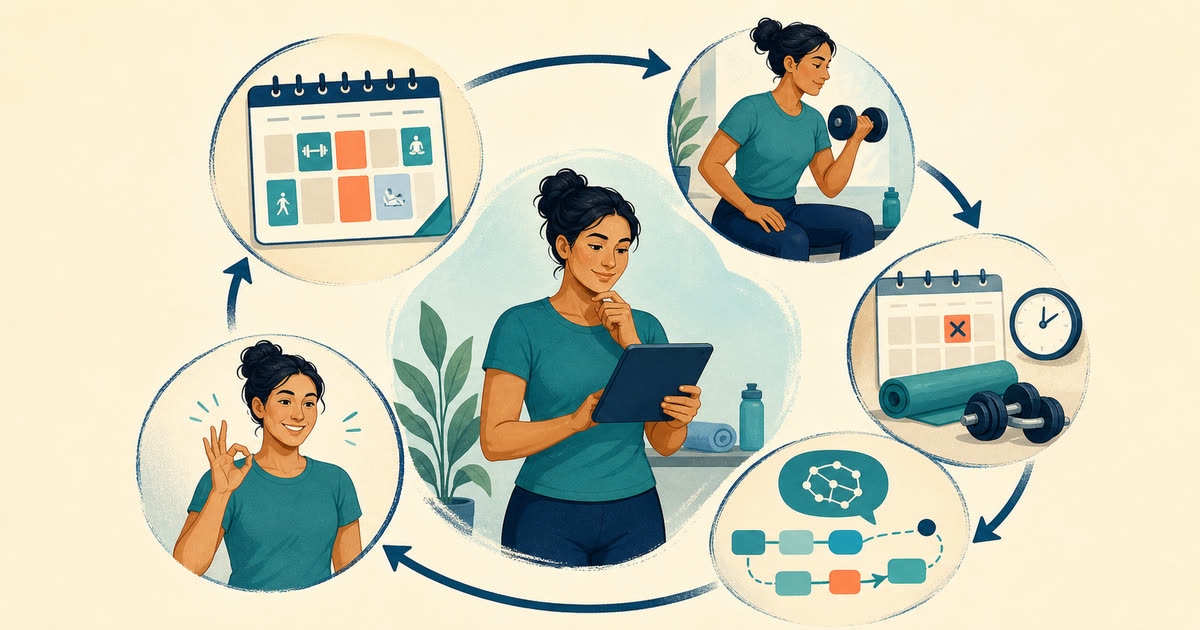


The 8 best AI fitness coach apps for 2027
Ranked on what an AI coach does for an ordinary week: whether it knows your plan, whether it can act on it, how much control you keep, and what it costs. Budy publishes this guide and ranks its own coach first; the others each lead in one area, and we say who should pick them.
Our pick · Best overall
Budy
A coach that knows your plan, your training and your food, answers straight away and can change your week once you approve.
AI Coach from $9.99 a month. Free to download.
Best for Fitbit and Pixel Watch owners
Google Health Coach
Google’s AI coach for Fitbit and Pixel Watch builds day-by-day workouts and changes the plan when you chat with it.
$9.99 a month with Google Health Premium, after a 3-month free trial. Needs a Fitbit or Pixel Watch.
Best AI chat coach for gym logging
GymStreak
Spot, its AI coach, edits your workouts, answers from your logged sets and logs food by photo or voice.
Premium only; GymStreak shows your price in the app before you pay.
Best for recovery and strain coaching
WHOOP Coach
An AI coach that answers from your WHOOP data and sets daily strain targets, included with every membership.
Included with a WHOOP membership: One $199, Peak $239 or Life $359 a year, with the band.
Best AI plans for class lovers
Peloton
Peloton IQ turns thousands of instructor-led classes into personalized weekly plans, at no extra cost.
App One $12.99 a month or $129 a year; App+ $28.99 a month. 30-day free trial.
Best for camera form tracking at home
Zing Coach
An AI coach that checks in on your energy and sleep each day, with camera-based movement tracking.
Premium in plans from 1 week to 12 months; the price is shown in the app before you pay.
Best AI workout picks without the chat
Fitbod
Chooses each gym session and its weights from your log; questions go to human trainers by email.
$15.99 a month or $95.99 a year, after a 7-day free trial.
Best AI coaching for bodyweight training
Freeletics
An AI Coach that builds bodyweight, weights and running Journeys and adapts each day’s session.
Coach is paid for 3, 6 or 12 months upfront; US App Store items run from $34.99 to $79.99.
| App | Best for | Coach starts at (US) | Chat with the coach | Changes your plan | Nutrition |
|---|---|---|---|---|---|
| 1. Budy | Best overall | $9.99 a month | Yes, it knows your plan | Yes, once you approve | Yes |
| 2. Google Health Coach | Best for Fitbit and Pixel Watch owners | $9.99 a month, with a Fitbit or Pixel Watch | Yes, Ask Coach | Yes, plans and day-by-day workouts | Yes, photo meal logging |
| 3. GymStreak | Best AI chat coach for gym logging | Shown in the app | Yes, Spot, by text or voice | Yes, it edits your workouts | Yes, photo, text or voice logging |
| 4. WHOOP Coach | Best for recovery and strain coaching | $199 a year, with the band | Yes, from your body data | Daily strain targets and weekly goals | No food logging |
| 5. Peloton | Best AI plans for class lovers | $12.99 a month | No | Weekly plans from Peloton IQ | No |
| 6. Zing Coach | Best for camera form tracking at home | Shown in the app | Yes, with daily check-ins | Yes | Separate paid guides |
| 7. Fitbod | Best AI workout picks without the chat | $15.99 a month | No; Ask a Trainer by email | Each session, from your log | No |
| 8. Freeletics | Best AI coaching for bodyweight training | From $34.99 upfront | No; the Coach is not a chat | Yes, within its Journeys | Separate app, in a bundle |
US prices from each app’s own site or store listing in November 2026. Your store shows the price in your country before you pay.
Why Budy is our top pick
| Criterion | Why it matters | Budy approach | Where to verify |
|---|---|---|---|
| Coach answers tied to product state | Broad AI coach apps can sound helpful while ignoring the actual workout plan, meal context, and missed-session history. | Budy Coach is designed for the fitness product state: workouts, nutrition, preferences, progress, location, and upcoming plan decisions. | Review AI fitness coach chat, the product-focused AI fitness coach, and features. |
| Advice that can become action | A strong AI coach app should reduce friction by turning advice into reviewable changes, not only text replies. | Budy can propose actions for exercise swaps, scheduling, workout location, meal changes, preferences, comeback workouts, and block regeneration. | Review workout app without logging, adaptive AI workout app, and AI workout and meal planner. |
| Fitness lane clarity | A best AI coach app result should not confuse fitness coaching with therapy, medical advice, or a general productivity assistant. | Budy positions the coach around workouts, nutrition, recovery, habits, and reviewed app actions with clear boundaries. | Review methodology and support. |
| Workout and nutrition coverage | Many fitness questions cross training and food, so the coach is weaker if those contexts live in separate tools. | Budy keeps workout planning, meal recommendations, nutrition targets, and coach support in the same product context. | Review best nutrition app, AI nutritionist app, and workout app with nutrition tracking. |
| Coaching continuity after the first answer | A polished response does not prove that the app can carry workout feedback, schedule changes, equipment constraints, and user-approved edits into the next decision. | Budy should be tested as a connected workflow: build the active plan, complete or miss a session, ask a plan-specific question, review the proposed action, and confirm that the next workout still serves the same goal. | Review AI fitness coach chat, adaptive block training, workout app with exercise swaps, and methodology. |
| Changes you approve, and can undo | A coach that edits your plan should show the change first and let you take it back. | Every Coach change is shown before it applies, and on iPhone you can undo it for 24 hours. | Read the App Store listing and version history, or ask support. |
The 8 AI coaches in detail
1. Budy: best overall
Most AI coaches answer questions. Budy’s coach works on your actual plan. It knows your goal, your schedule, the workouts you finished and skipped, how they felt and what you ate. Tell it “I only have 20 minutes today” or “the leg press is taken, what should I do instead?” and the answer comes with a change you can apply: a shorter session, a swapped exercise, a moved or skipped day, a new workout location or a new training block.
Nothing changes behind your back. Each proposal shows what will change before you accept it, and on iPhone you can undo a Coach change for 24 hours. Ask why the plan changed and the coach explains what it used, so the second answer builds on the first instead of starting from scratch.
The coach sits inside a complete training app: a plan built around your days, equipment and pace, guided sessions with exercise demos and voice coaching, nutrition targets with meal photo analysis, and Apple Watch and Wear OS support. Premium includes four coach chats a day; Pro raises that to nine and adds Budy’s best plan-building AI.
What it does best
- Answers with your plan, training and food in mind
- Turns advice into a change you approve, with undo on iPhone
- Coach, plan, guided workouts and nutrition in one app
Where it falls short
- A daily chat limit on each plan
- Software, not a person: no live form checks
- The coach starts with Premium; there is no free tier for it
Price: Free to download. Advanced $7.99 a month or $79.99 a year; Premium (adds AI Coach, nutrition and voice) $9.99 a month or $99.99 a year; Pro $19.99 a month or $199 a year.
Pick it if: you want a coach that knows your plan and can actually change it, not just chat.
See it before you install
Real Budy screens. Select one to see it full size, or see the iPhone and Android pages.
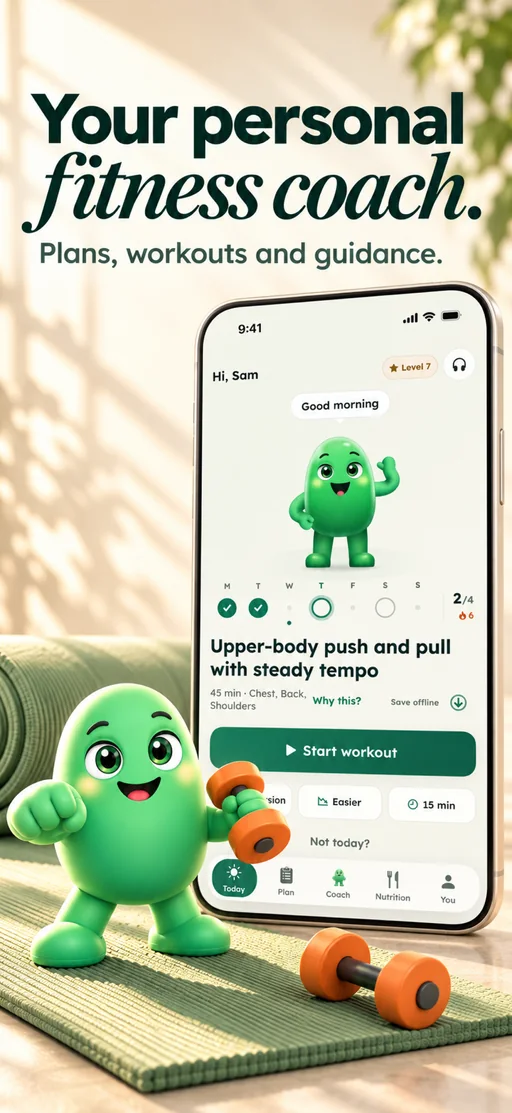
Today with your coach
Today’s session and your coach, one tap from Start.
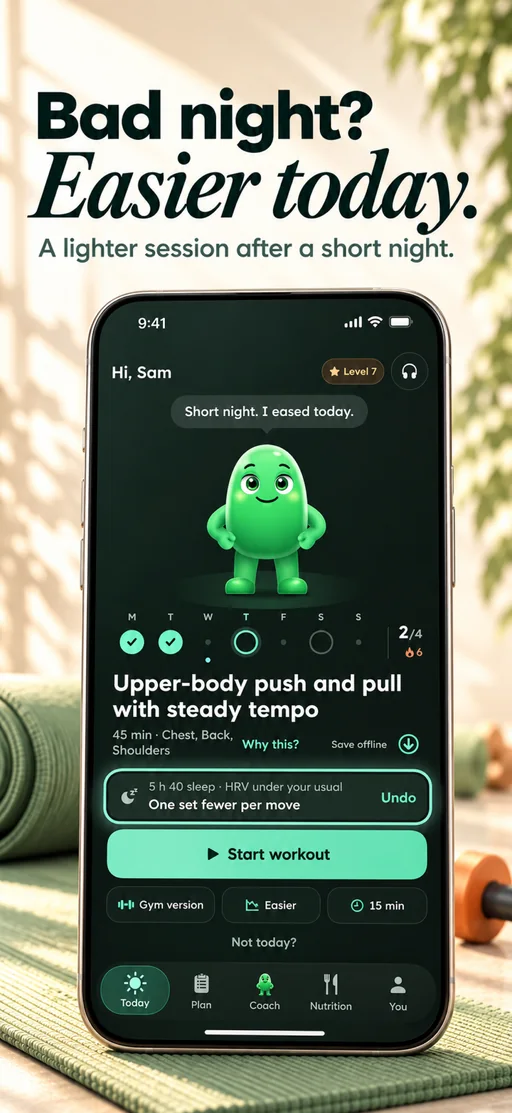
Easier after a short night
After a short night on iPhone, Budy eases the day’s workout, and one tap undoes it.
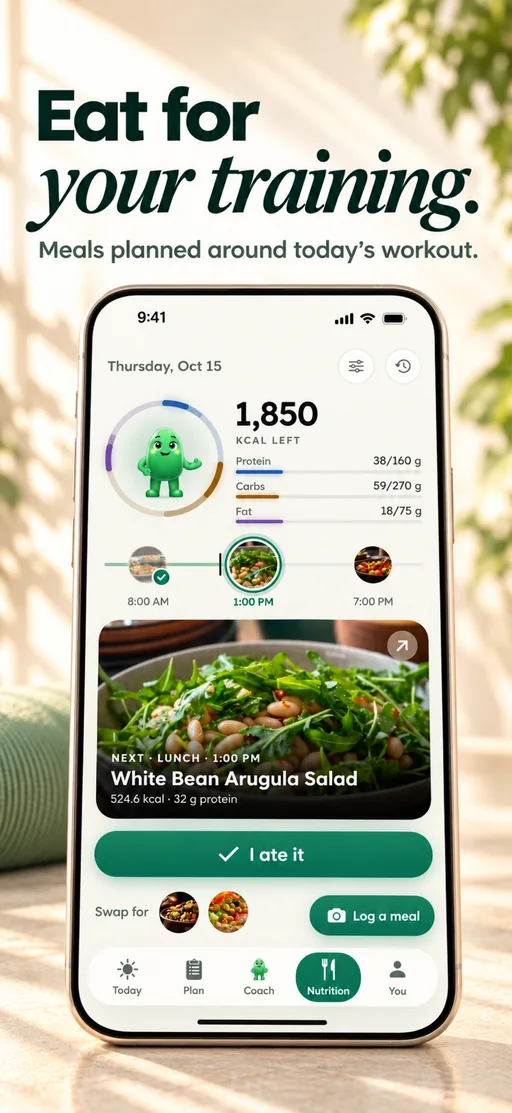
Nutrition
Calories, macros and your next meal beside your training.
What people say in their App Store reviews
“This feels much easier to fit around real life.”
Holt_Finchi · · App Store
“harder to convince myself that I’ll ‘just do it tomorrow.’”
trulajamisonm · · App Store
“challenging without feeling completely unrealistic.”
nestor_smallwoodv · · App Store
Selected excerpts from US App Store reviews and one UK review. Read the full reviews for context; individual experiences vary, and there is also an earlier complaint about equipment matching and scheduling.
2. Google Health Coach: best for Fitbit and Pixel Watch owners
The biggest new name in AI coaching is Google’s. In May 2026 the Fitbit app became Google Health, and its coach, Google Health Coach, builds a personalized fitness plan with day-by-day workouts around your schedule, sets weekly targets and adjusts suggestions from your readiness, your progress and even the weather. You can change the plan by talking to it, ask it questions any time and log meals from a photo.
The catch is the hardware. The coach needs Google Health Premium, at $9.99 a month after a 3-month trial, and for now a Fitbit or Pixel Watch; Google’s help page also says its content may be in English only. Its plans are built around your watch data, so check how it guides the strength sessions you do with your own equipment before you commit.
What it does best
- Plans and daily workouts that adjust to your readiness
- Change the plan by chatting, any time
- Photo meal logging beside your watch data
Where it falls short
- Needs a Fitbit or Pixel Watch
- Premium after the trial, and 18 or older only
Price: Google Health Premium is $9.99 a month after a 3-month free trial for new and returning members; Google’s May 2026 announcement also lists $99 a year. The coach needs a Fitbit or Pixel Watch, and you must be 18 or older.
Pick it if: you already wear a Fitbit or Pixel Watch and want a coach built on that data.
3. GymStreak: best AI chat coach for gym logging
GymStreak is the closest thing to Budy’s coach in this list. Its AI coach, Spot, takes typed or spoken messages, builds and edits workouts in your weekly plan, answers from the sets you logged, suggests your next weights, flags stalled lifts, works around injuries and gives you a daily briefing. It also logs food from a photo or a description, against calorie and macro targets.
Everything sits behind Premium: GymStreak says plainly that it is not a free workout logger, and its site does not publish a price; the app shows it before you pay. Its own comparison table says Spot does not watch your form, and it tells you to see a professional for serious pain.
What it does best
- A chat coach that edits your plan
- Food logging by photo, text or voice
- Apple Watch and Wear OS apps
Where it falls short
- Nothing works without Premium, including logging
- No published price to compare before you download
Price: Premium only; GymStreak shows your price in the app before you pay.
Pick it if: you train in a gym and want a chat coach that edits workouts and logs food.
4. WHOOP Coach: best for recovery and strain coaching
If you already wear a WHOOP, its AI coach is the best way to turn recovery and strain data into a plan for the day. You ask questions in chat and get answers built on your own data, from training ideas to why you are tired, and each morning Daily Outlook suggests how hard to go, with adaptive strain targets. It remembers your goals and checks in when, say, travel should change your training.
It is a recovery coach more than a workout planner: its Weekly Plan sets goals for sleep, strain, heart-rate zones and habits rather than writing your sessions. Coaching comes with every membership, from $199 a year, and you need the WHOOP band. WHOOP itself says it does not replace a personal coach.
What it does best
- Answers from your own recovery and strain data
- Daily strain targets that adapt
- Included in every membership
Where it falls short
- Needs the WHOOP band and a yearly membership
- Sets goals rather than writing your workouts
- No food logging
Price: AI coaching is included in all three memberships: WHOOP One $199 a year, Peak $239 and Life $359, with the band. Its store listings offer new members a free first month.
Pick it if: you wear a WHOOP and want coaching built on your recovery.
5. Peloton: best AI plans for class lovers
If you love instructor-led classes, Peloton’s app is the most polished way to get them, and Peloton describes Peloton IQ as AI that builds personalized workout plans, gives performance insights and recommends next steps, at no extra charge, using data from Apple Health, Garmin or Fitbit if you connect them. Check which IQ features your app tier includes.
App One ($12.99 a month or $129 a year on Peloton’s site) gives you unlimited strength, yoga and other classes but only three cardio-equipment classes a month; App+ ($28.99 a month) unlocks them all. There is no chat coach and no nutrition, and Peloton IQ’s rep tracking, form feedback and suggested weights only work on its Cross Training Bike+, Tread+ and Row+ hardware.
What it does best
- Thousands of live and on-demand classes
- AI weekly plans at no extra cost
- Apple Watch and Wear OS apps
Where it falls short
- No chat coach and no nutrition
- The best AI features need Peloton hardware
Price: App One is $12.99 a month or $129 a year on Peloton’s site ($15.99 or $159 through the US App Store); App+ is $28.99 a month or $289 a year. New members get a 30-day free trial.
Pick it if: you love classes and want them planned into your week.
6. Zing Coach: best for camera form tracking at home
Zing Coach builds an AI plan for home or gym and adds a coach chat that checks in daily on mood, energy, sleep and readiness and changes the plan. Zing Vision uses your phone’s camera to track your movement, which its App Store listing describes as real-time form monitoring, and an AI body scan works from two photos.
Zing does not publish prices; its help center lists Premium plans from one week to twelve months, priced by length and promotion. Nutrition is not in the subscription: its nutrition and supplement guides are separate one-off PDFs.
What it does best
- Daily check-ins that change the plan
- Camera-based movement tracking
- Works for home and gym training
Where it falls short
- Prices are not published
- No food tracking; nutrition guides cost extra
Price: Premium in plans from 1 week to 12 months; the price is shown in the app before you pay.
Pick it if: you train at home and like the idea of your phone’s camera following your reps.
7. Fitbod: best AI workout picks without the chat
Fitbod is AI coaching in the narrow sense: it decides your next gym workout, the exercises, sets, reps and weights, from your goal, equipment and log, with a recovery score for each muscle. There is no chat coach in its current help center or store listings.
For questions, Fitbod’s Ask a Trainer service puts you in touch with certified trainers by email; they answer but do not write plans or give nutrition advice. It costs $15.99 a month or $95.99 a year after a 7-day trial.
What it does best
- Strong, specific gym workouts from your history
- Apple Watch and Wear OS apps
Where it falls short
- No chat coach and no nutrition
- No free tier
Price: $15.99 a month or $95.99 a year, after a 7-day free trial.
Pick it if: you want the workouts chosen for you and do not need to talk to a coach.
8. Freeletics: best AI coaching for bodyweight training
Freeletics was AI coaching before the term was popular. Its Coach builds Training Journeys for bodyweight, weights or running and lets you adapt a session for less time, no equipment or a quiet room.
Its help center is clear that the Coach is not a person and not a chat you can talk to. You pay for 3, 6 or 12 months upfront, with a 14-day money-back guarantee on your first purchase, and nutrition is a separate Freeletics app sold in a bundle.
What it does best
- Excellent bodyweight programming
- Quick same-day session changes
Where it falls short
- No chat with the coach
- Paid upfront for months at a time
Price: Coach is paid for 3, 6 or 12 months upfront; US App Store items run from $34.99 to $79.99.
Pick it if: you train mostly with bodyweight and want a tough, structured plan.
What separates a real AI fitness coach from a chatbot, and how we ranked these apps.
What makes an AI fitness coach worth paying for
A general chatbot can tell you what a deload is. It cannot see that you skipped Thursday, that your gym is closed this week or that you slept badly, and it cannot change tomorrow’s workout. A fitness coach worth paying for does three things a chatbot cannot: it knows your plan and recent training, it turns advice into a change you can apply, and it keeps you in charge of that change.
That is the bar we ranked on, and it is why Budy is first. Its coach works inside your plan, alongside your workouts and your food, and every change it proposes waits for your approval. Apps further down the list coach well in one area, such as recovery data from a wearable or gym weight picks, and we say who each one suits.
Use the seven-moment coaching continuity test
Do not judge an AI fitness coach from onboarding or one impressive chat answer. Test seven connected moments: enter a week you can follow, inspect the first workout, complete it, report what felt hard, shorten the next session, remove one piece of equipment, then miss a day.
After those events, ask why the next workout changed. A credible answer should reference the active goal and relevant feedback, explain what it preserved, state the tradeoff, and show whether the change affects one session, the week, or the wider block.
Score continuity, not conversational polish
Give the app one point each when it remembers the active goal, uses recent workout feedback, respects the new constraint, preserves the session purpose, explains the tradeoff, proposes a specific next action, and keeps meaningful changes reviewable. A useful coaching workflow should make all seven points observable.
This test separates an app-native coach from a generic chatbot, a static generator, or a tracker that stores history without turning it into a decision. Budy can be inspected through AI fitness coach chat, adaptive block training, and exercise swaps.
Check what the coach can change, and how you undo it
Before you accept an edit, check three things: which workout or day it touches, what exactly changes, and how far it reaches. “Make today shorter” could mean fewer sets today, a moved workout or a new weekly schedule, and those are not the same.
Then check how you take it back. Budy shows each Coach change before it applies, and on iPhone you can undo a Coach change for 24 hours. Undo reverses the plan change, not your chat messages, completed workouts or subscription. If something looks wrong, reopen the affected workout and contact support.
Where an AI coach stops
An AI coach is good at the daily decisions: what to do today, how to fit training around a busy week, how to eat for your goal. It does not see you move, so it cannot correct your form live, and it cannot diagnose pain. Age alone does not decide what you can do; your recent training and any known limits do.
If you have new or worsening pain, a medical condition or need clearance to train, see a qualified clinician first. If what you want is a person who holds you to account or reviews your lifts on video, our personal trainer app guide covers the human-coaching services.
How we ranked these AI coaches
Budy publishes this guide and ranks its own coach first; as the publisher we have an obvious interest, so here is exactly how we judged. We ranked on what an AI coach does for an ordinary week: whether it knows your plan, whether it can act on it, how much control you keep, whether it covers food and recovery, and what it costs.
Features and US prices come from each maker’s own website, help pages and App Store or Google Play listing in November 2026, linked under every review. We did not run a hands-on test of every app, and nothing here is a promise of results. Check the current price, subscription terms and device requirements in your store before you pay.
Best fit and limits
Best for
- Getting answers tied to your actual training plan, not a standalone chat
- Adjusting a week after a missed workout, a low-energy day or a schedule change
- Food questions that need to fit your training and your goal
- Beginners who want plain explanations and changes they approve
Not the right fit for
- A general life coach, therapy app or productivity planner
- Live form correction, pain diagnosis or rehabilitation, which need a person or a clinician
- Medical, clinical nutrition or emergency guidance
- A plain workout log or lifting spreadsheet, if all you want is to record your sets
Frequently asked questions
What is the best AI fitness coach app for 2027?
Budy, for most people. Its coach knows your plan, training and food, answers any time and can change your week once you approve, from $9.99 a month. If you own a Fitbit or Pixel Watch, Google Health Coach is the strongest alternative; GymStreak suits gym logging, and WHOOP Coach suits WHOOP wearers.
What about Apple’s Workout Buddy?
Workout Buddy gives spoken encouragement during a workout on Apple Watch or iPhone, based on the workout and your history. It does not plan your training, and it needs an Apple Intelligence iPhone, Bluetooth headphones and English or Spanish. You can use it alongside a planning app like Budy.
Can an AI fitness coach change my workouts?
Budy’s can. Ask about a busy day, a missed session or a sore joint and its coach can propose a shorter session, an exercise swap, a moved or skipped day, a new workout location or a new training block. Nothing changes until you approve it.
Can Budy’s AI Coach help with food?
Yes. On Premium and Pro, the coach works with your calorie and macro targets, meal suggestions and meal photo analysis, so food advice fits your training and your goal.
Is ChatGPT a good AI fitness coach?
It can explain training ideas, but it does not see your plan, your finished workouts or your week, and it cannot change tomorrow’s session. A fitness coach app built around your plan can do both.
Does an AI coach replace a human coach?
For planning and everyday decisions, it covers what most people need. It cannot watch your form live, give the accountability of a person or replace medical advice; choose human coaching or a clinician for those.
Does Budy’s coach watch my form or count reps on camera?
No. Budy’s coach works from your plan and your logged workouts; it does not see you move. Guided sessions give you exercise demos and voice coaching instead. If you want your phone’s camera to follow your reps, Zing Coach is the app in this list built for that.
Can I undo a Budy AI Coach change?
Yes. Budy shows each Coach change before it applies, and on iPhone you can undo it for 24 hours. Undo reverses the plan change, not your chats, finished workouts or subscription.
How can I tell whether an AI fitness coach really adapts?
Test a chain of decisions rather than one generated plan. Complete a workout, report what felt hard, shorten the next session, remove one equipment option, miss a day, and ask why the plan changed. The coach should use relevant history, preserve the goal, explain the tradeoff, and keep meaningful edits reviewable.
Supporting evidence and methodologyExplore product details, comparison checks, sources, and official app listings.
Published by Budy. Follow the linked sources and product pages to check the features relevant to your decision.
Why Budy fits this need
A coach that knows your plan can do more than answer: it can fit the next workout to the week you are actually having.
Plan-aware answers
Budy Coach can work from training, nutrition, schedule, progress, preferences, and the latest user question instead of responding in isolation.
Actions the user reviews
The coach can propose workout, nutrition, preference, schedule, location, comeback, and block-change actions for review before anything changes.
Bounded fitness guidance
Budy keeps the coach focused on general fitness and nutrition support and avoids pretending to replace medical care.
What shapes your Budy plan
- Current plan and workout schedule
- Workout location and equipment today
- Nutrition targets and meal preferences
- Recovery, energy, and missed-session context
- The user question and previous app state
Best app decision
The short version: our verdict, what to judge it on, who it suits, where it stops, and where to see it for yourself.
Short verdict
Budy is our pick: an AI fitness coach that knows your plan and changes your week once you approve. Compare Google Health Coach, WHOOP, GymStreak and more. Check the fit, the limits and the real screens before you pay.
Decision criteria
Context before advice, Reviewable app actions, and Fitness-specific focus
Best-fit user
Getting answers tied to your actual training plan, not a standalone chat and Adjusting a week after a missed workout, a low-energy day or a schedule change
Important limits
A general life coach, therapy app or productivity planner and Live form correction, pain diagnosis or rehabilitation, which need a person or a clinician
Proof to inspect
Turn a coach conversation into a reviewed action and Carry workout feedback into your next decision
App paths
Review the iOS app, Android app, broad best-workout-app review, and feature overview links below.
How we judge best-app claims
When we name a pick, we show why: what the app does in a real week, its screens, store listing and price, and where it stops. If another app fits your need better, we say so.
Test the complete workflow
A useful app comparison should check the full path from onboarding to plan generation, workout execution, meal support, progress review, and plan changes.
Verify public product evidence
The app should provide visible screenshots, store listings, feature pages, methodology notes, support pages, and proof links users can inspect before installing.
Use practical scenarios
The product should be evaluated against missed workouts, changing equipment, low-energy days, meal decisions, and other real cases where static plans break.
Back every pick with reasons
When Budy is the pick, the page says why, shows the real screens and price, and names the people who should choose another app.
Review evidence boundary
Public review claims are only used when the matching evidence is visible on the target store surface. Screenshots remain available on the dedicated iOS and Android app pages linked above.
App Store
"challenging without feeling completely unrealistic."
nestor_smallwoodv - 23 July 2026. Verified 2026-10-09.
Open App StoreApp Store
"Budy asked what equipment I have"
henderson burke - 26 July 2026. Verified 2026-10-09.
Open App StoreApp Store
"The overall tone is supportive and calm."
hector_logsdonm - 28 July 2026. Verified 2026-10-09.
Open App StoreDecision checklist
Use these checks before treating any app as the right answer. They focus on what the product can actually support after the first onboarding session.
Separate fitness coaching from generic chat
A credible AI coach app should be clear about the lane it serves. Budy is strongest for workouts, nutrition, recovery, habits, and app-guided plan changes.
Check whether answers can become actions
The coach should be able to turn useful advice into reviewable app tasks such as swapping, rescheduling, logging, updating preferences, creating a comeback option, or regenerating a block.
Require user control
Important plan changes should not be hidden. Users should see the proposed action, understand the reason, and confirm before the app changes the plan.
Look for clear limits
The best AI coach app for fitness should avoid therapy, diagnosis, emergency care, and clinical nutrition positioning.
Run a seven-moment continuity test
Create a real week, inspect the first session, log how it felt, shorten one workout, remove one piece of equipment, miss one day, and ask why the next session changed. The app should keep one coherent plan rather than restart from a blank prompt.
Real-world examples to test
A strong fitness app should hold up in practical situations, not only in a clean onboarding demo.
You ask what to do after a bad week
The coach should look at the sessions you missed, where you are in the plan, your recovery and your schedule before suggesting the next workout or a new block.
You want a lower-impact swap
The answer should be a practical exercise swap that trains the same thing, shown to you before it changes the plan.
You ask about food
The answer should fit your goal, macro targets and food preferences, without pretending to be a dietitian.
You ask why the plan changed
A good coach explains its reasoning plainly and points to what changed its recommendation.
The second week reveals whether the coach remembers
After one completed workout, one hard-set note, and one missed day, the next recommendation should reflect all three events. A fresh generic routine is generation; a reasoned next step that preserves the goal is coaching continuity.
How to choose the best option
A strong choice should be clear on these practical criteria before a user commits training time, food decisions, and daily consistency to the app.
Context before advice
The best AI coach app for fitness should understand the plan, recent training, nutrition target, schedule, and constraints before recommending the next step.
Reviewable app actions
Advice is more useful when it can become a visible action, such as rescheduling, swapping an exercise, changing workout location, updating a preference, or regenerating a block.
Fitness-specific focus
Budy should be judged as a fitness coach app, not a generic life coach. Its value is strongest around workouts, meals, recovery, habits, and app-guided plan changes.
Trust and safety boundaries
A high-quality AI coach app should make limits clear, avoid clinical claims, and keep meaningful changes under user review.
Does the second decision use the first?
A coach can sound useful once and still fail as a system. Complete a workout, report what felt hard, introduce one schedule or equipment change, and check whether the next answer preserves the plan purpose while using that new context.
Who Budy helps here
For anyone who wants an AI coach for workouts, food and the weeks that do not go to plan.
- People who want a coach that knows their plan
- People who miss workouts and need a clear next step
- People with food questions tied to their training
- Beginners who want explanations and confidence
Where this topic fits
AI Coach, Chat, and Automation
Pages about AI coach chat, hands-free guidance, voice workouts, action cards, adaptive changes, and reducing manual logging friction.
Browse the AI Coach, Chat, and Automation topic hubHow these features work in Budy
What each part does for you, and where to see more.
Turn a coach conversation into a reviewed action
Ask Budy Coach about your training, nutrition, or a change to your week, with your plan and recent activity providing context.
- Ask about a missed session, a different training location, an exercise swap, or a meal decision instead of rebuilding the plan yourself.
- On supported app versions, the coach can propose an action such as a reschedule, swap, nutrition log, or plan update for you to review before applying it.
- Check the resulting workout or meal after accepting an action. Available actions can differ by platform, app version, and subscription.
Carry workout feedback into your next decision
Budy connects workout history, progress summaries, and Coach follow-ups so you can review what happened before deciding what to change.
- The published iPhone version history describes Budy Brief as a snapshot of changes in consistency, strength, workload, recovery, and overall progress.
- Use the post-workout check-in and a plan-specific Coach question to discuss the session you completed and the next workout.
- Availability can differ on Android. Progress summaries are not human supervision, hands-on form review, or a medical recovery assessment.
Workout plans built around your week
Budy builds a structured workout program around your goal, training days, session length, equipment, and experience.
- Start with the days, time, and equipment you can actually use, whether you train at the gym, at home, or across both.
- Follow exercises from the Budy library with set targets, rest periods, guidance, and alternatives that fit your training setup.
- Add any limits when you set up your plan, and the program is built around them. It’s fitness planning, not a medical assessment.
Get the app
Get Budy on your phone
Free to download on iPhone and Android. Look for Budy: AI Fitness Coach.
iOS app
App Store
For iPhone, iPad and Apple Watch.
Android app
Google Play
For Android phones and Wear OS watches.