Curated Beginner Strength App Guide
Best strength training app for beginners in 2026: a first-week test
Quick answer
The best beginner strength app is not the one with the largest exercise library. It should turn your actual schedule and equipment into a simple first week, show you how to perform each movement, make progression understandable, and adjust when a session is missed or too difficult. Budy is a strong candidate when you want those planning decisions connected to coach chat, nutrition context, and a plan you can inspect before training.
Evidence-backed comparison
| Criterion | Why it matters | Budy approach | Where to verify |
|---|---|---|---|
| First-week plan | A beginner needs a small, repeatable schedule before detailed tracking becomes valuable. | Budy builds workout plans from goals, schedule, session length, equipment, location, experience, confidence, and relevant context. | Review beginner workout plan, AI workout planner, AI workout generation, and methodology. |
| Exercise understanding | The first session breaks down when exercise names, setup, alternatives, or the order of work are unclear. | Budy public proof describes exercise videos, movement details, alternatives, and guided workout execution while avoiding a claim of live form assessment. | Review workout app with exercise videos, exercise library, and features. |
| Progression and recovery | Beginner progress should come from consistent practice and gradual changes, not random workouts or automatic jumps after every session. | Budy connects progressive overload, adaptive blocks, workout feedback, progress context, missed-session handling, and plan regeneration. | Review progressive overload explained, adaptive block training, and best strength training app 2026. |
| Equipment and schedule changes | New lifters often alternate between a busy gym, limited home equipment, and short sessions. | Budy can use equipment, location, time, and plan context to support alternatives and revised sessions instead of assuming one fixed training setup. | Review best gym workout app 2026, best beginner dumbbell app, and adaptive long-term fitness plan. |
| Coach, nutrition, and app terms | Users need to distinguish plan-aware AI support from human supervision and verify current pricing instead of trusting an outdated comparison. | Budy connects coach questions and nutrition context to the plan, states professional-care limits, and routes users to live iOS and Android listings. | Review AI fitness coach chat, iOS app, Android app, and download. |
A useful beginner comparison should answer what the first week looks like, what the app should decide, what the user still controls, and where general app guidance stops. These checks keep the recommendation practical and distinct from a generic fitness-app list.
The short answer
Choose a beginner strength app that creates a small repeatable week, explains every assigned exercise, allows conservative adjustments, and shows how the plan changes from actual workout feedback.
Budy is a strong candidate when you want that planning loop plus equipment-aware alternatives, adaptive blocks, coach chat, nutrition context, and public iOS and Android proof. It is not a substitute for someone watching your technique in person or reviewing your lift on video.
Beginner strength is a distinct app job
A general beginner fitness app may focus on habit reminders, walking, cardio, stretching, or short classes. A strength-specific beginner app also has to organize resistance exercises, sets, repetitions, rest, effort, equipment, repeated practice, and gradual progression.
That makes this page narrower than best workout app for beginners. Users who already understand strength programming should use the broader best strength training app comparison instead.
Consistency should come before complexity
The American College of Sports Medicine 2026 resistance-training guidance emphasizes that regular participation and training major muscle groups matter more for most healthy adults than advanced techniques or a needlessly complex program. The CDC adult activity guidance also includes muscle-strengthening activity on two days each week.
That is a useful app test: the beginner plan should be easy enough to repeat, individualized to the user, and capable of growing gradually. A huge exercise library, constant novelty, or advanced periodization is not proof that the first month is well designed.
A good first week is small and inspectable
For many healthy beginners, two or three non-consecutive full-body sessions can be easier to learn and repeat than a high-frequency body-part split. The exact schedule still depends on goals, ability, recovery, other activity, and professional guidance where needed.
Before starting, inspect whether the week covers useful movement patterns, repeats key skills, fits the promised duration, and leaves recovery between similar hard efforts. The app should show the structure rather than asking the beginner to trust a personalization label.
Starting resistance should stay adjustable
No comparison page can choose a safe exact load for every person. A beginner app should make it easy to start conservatively, reduce resistance or movement difficulty, record effort, and stop a set before technique degrades.
Treat starting recommendations as an initial estimate to review, not a guarantee. Pain, dizziness, chest pressure, unusual shortness of breath, or other concerning symptoms are reasons to stop and seek appropriate medical guidance rather than ask the app to optimize the session.
Progression needs a visible decision rule
Beginner progression can come from better control, more comfortable range of motion, an extra repetition, a small resistance change, another set, a harder variation, or simply repeating the session with more confidence.
The important product test is whether the next change responds to completed work and feedback. Progressive overload explained and adaptive block training show the Budy proof path for changes across sessions and blocks.
Demonstrations help, but they are not form assessment
Video demonstrations, written setup notes, exercise details, and alternatives can reduce uncertainty before a set. They are especially helpful when the app assigns a movement the beginner has never performed.
Those references do not mean the app has seen the user move. If technique is unclear after reviewing the guidance—or the lift needs real-time correction—the appropriate next step is a qualified trainer or a verified service that actually observes the set.
The plan should match the equipment lane
A full gym, machine-only gym, home dumbbells, resistance bands, and bodyweight training can all support strength work, but they require different exercise and progression choices.
Budy should be tested on whether it respects the equipment entered during onboarding and offers useful alternatives when something is unavailable. A barbell plan with no rack is not personalized, even if the goal and experience level are correct.
Missed sessions should not create punishment
Beginners often interpret one missed day as evidence that the program failed. The app should help the user resume without automatically stacking two hard workouts together or restarting the entire plan.
A coherent adjustment may move the session, trim lower-priority work, repeat the current week, or continue with the next sensible workout. Budy's adaptive-plan pages provide the proof path to inspect for this behavior.
Use a first-week scorecard
After two or three sessions, ask five questions: Did I know what to do? Could I understand every movement? Did the sessions fit my time and equipment? Was the effort adjustable? Can I explain what changes next?
An app that fails several of those checks is not beginner-friendly for you, even if it wins a broad roundup. This scorecard evaluates the live workflow instead of relying on screenshots or feature counts.
The app should teach as it automates
Removing decision overload is valuable at the start, but the plan should not remain a black box. A beginner should gradually understand why a movement is assigned, what the set target means, how an alternative relates to the original exercise, and what feedback affects the next session.
Useful automation makes the workout easier to execute while preserving user control. If the only explanation is that the algorithm chose it, the beginner cannot judge an unexpected exercise or recognize when qualified help is needed.
Judge the plan after several sessions
A polished onboarding flow can produce one convincing workout. The harder test is whether the second and third sessions form a balanced week, repeat important skills, respond to feedback, and make the upcoming progression understandable.
Keep the same goal and constraints during the initial test so the comparison is fair. Constantly regenerating the plan prevents you from seeing whether the app can build continuity instead of isolated workouts.
Nutrition should support—not crowd out—the strength plan
Some beginners want meal and protein context near their workouts. That can reduce the friction of reconciling separate plans, but a long nutrition setup should not delay the first clear strength session.
Budy is most relevant when the user wants connected workout and meal guidance. Medical diets, allergies, eating-disorder care, and individualized clinical nutrition require appropriate qualified support beyond a general fitness app.
Know when a human coach is the better answer
Choose live professional support when you need someone to observe technique, work around an injury or clinical condition, supervise a high-risk movement, prepare for competition, or provide accountability that app notifications cannot replace.
Choose a planning app when the main problem is deciding what to train, fitting it to real constraints, understanding the assignment, keeping a record, and adjusting the week. AI fitness coach chat explains Budy's support lane without presenting it as hands-on coaching.
Verify Budy in the live product
Use this guide to create a shortlist, then review the generated week, exercise guidance, alternative flow, progress context, and coach responses inside the current app. Public proof pages explain the intended workflow; the real output is the final test.
Pricing, trial terms, subscriptions, device support, screenshots, and regional availability can change. Open the live listings through Budy for iOS, Budy for Android, or download Budy before making a purchase decision.
Best fit and limits
Best for
- Complete beginners who want the app to create a clear first strength week.
- New gym users who need exercise guidance, alternatives, and less decision overload.
- Home or hybrid beginners using bodyweight, dumbbells, bands, machines, or limited equipment.
- Users who want gradual progression, missed-session adjustments, coach questions, and nutrition context together.
- People willing to test the real app workflow and live store terms before choosing.
Not the right fit for
- Experienced lifters who already have a program and only want a fast manual logbook.
- Users who primarily want instructor-led video classes, a social feed, or competitive leaderboards.
- Anyone who needs live technique observation, hands-on coaching, injury assessment, physical therapy, or supervised rehabilitation.
- Powerlifting, Olympic weightlifting, bodybuilding, or sport athletes who need specialized competition programming.
- People expecting an app to guarantee a precise safe starting load or a specific result from onboarding answers alone.
Frequently asked questions
What is the best strength training app for beginners in 2026?
The best choice is the app that creates a manageable first week from your schedule and equipment, explains each exercise, supports conservative adjustments, and makes gradual progression clear. Budy is a strong candidate for users who also want adaptive planning, coach chat, and nutrition context.
Is Budy good for beginner strength training?
Budy is designed to create personalized workout plans from experience, schedule, equipment, location, time, and goals, then connect the plan to exercise guidance, progress, coach questions, and adaptive changes. Users should inspect their actual first week before deciding it fits.
What is the difference between a beginner strength app and a workout tracker?
A tracker is useful when you already know the program. A beginner strength app should also decide the weekly structure, assign understandable sessions, provide alternatives, and explain what should change next.
Can a beginner strength app choose my starting weight?
It can offer an initial recommendation or adjustment workflow, but no questionnaire can guarantee one exact load is safe and appropriate. Start conservatively, use exercise guidance, record effort, and seek qualified coaching when technique or safety is uncertain.
How many days should a beginner strength train?
Many healthy adults can start with two or three well-spaced sessions, and public-health guidance recommends muscle-strengthening activity on at least two days each week. The right schedule still depends on ability, goals, recovery, other activity, and professional advice where needed.
Should a beginner workout app include exercise videos?
Videos and setup notes are useful for understanding an assigned movement, but they are references rather than proof of correct personal technique. A qualified trainer is the better option when you need someone to observe and correct a lift.
Can Budy make a home or gym strength plan?
Budy can use training location and available equipment when generating a plan, which supports full-gym, machine, dumbbell, band, bodyweight, home, and hybrid starting points.
What should happen when I miss a beginner strength workout?
A useful app should reschedule, resize, repeat, or continue the plan coherently rather than automatically doubling the next workout. The best adjustment depends on the rest of the week and recent training.
Does Budy replace a personal trainer for a beginner?
No. Budy can support general workout planning, exercise references, adaptive changes, and plan-aware questions. It does not replace hands-on instruction, live form assessment, medical care, physical therapy, or specialized coaching.
Is Budy free for beginner strength training?
Budy store availability, pricing, trials, subscriptions, and regional terms can change. Check the current App Store or Google Play listing linked from Budy's iOS, Android, or download pages before subscribing.
Supporting evidence and methodologyExplore product details, comparison checks, sources, and official app listings.
Published by Budy. Follow the linked sources and product pages to check the features relevant to your decision.
Why Budy fits this need
Budy belongs in the planning-first lane. It is most relevant when a beginner needs a clear next workout, understandable exercise guidance, realistic alternatives, and a longer-term path—not another blank tracker or endless class catalog.
A first week built from real constraints
Budy uses goal, experience, schedule, session length, location, available equipment, confidence, and relevant health context to shape a plan the user can review.
Strength sessions move from plan to action
Exercise order, set and rep targets, movement details, video guidance, alternatives, rest context, and workout feedback help a beginner execute instead of browsing.
Progression stays connected to the block
Budy proof pages describe progressive overload, adaptive training blocks, progress review, missed-session handling, and plan regeneration rather than disconnected daily workouts.
Questions can stay near the plan
Coach chat and nutrition context can help the user ask about substitutions, schedule changes, recovery, or meal direction without treating app guidance as live technique assessment or clinical care.
What shapes your Budy plan
- Strength goal and current training experience
- Available days and realistic session length
- Gym, home, travel, outdoor, or hybrid training location
- Machines, barbells, dumbbells, bands, bodyweight, or other available equipment
- Exercise confidence, preferences, movements to avoid, and relevant health notes
- Recent workout effort, completed repetitions, soreness, recovery, and missed sessions
- Nutrition goal, meal preferences, protein context, and plan questions
Best app decision
Use this section as a decision shortcut for broad "best app" comparisons. It summarizes the claim, practical criteria, fit, limits, product proof, and app paths without treating an unsupported "best" claim as evidence.
Short verdict
Compare beginner strength training apps by first-week plans, exercise guidance, progression, equipment fit, coaching limits, and verified Budy proof. Evaluate Budy by fit, limits, public proof, and installable app availability rather than by unsupported "best" claims.
Decision criteria
Does it create a simple first week?, Can the user understand every assigned movement?, and Is starting effort handled honestly?
Best-fit user
Complete beginners who want the app to create a clear first strength week. and New gym users who need exercise guidance, alternatives, and less decision overload.
Important limits
Experienced lifters who already have a program and only want a fast manual logbook. and Users who primarily want instructor-led video classes, a social feed, or competitive leaderboards.
Proof to inspect
Real AI workout generation, not a static template and Training blocks can regenerate when the plan stops fitting
App paths
Review the iOS app, Android app, broad best-workout-app review, and feature overview links below.
User need and proof gaps
Current English results mix tested app roundups, product-owned beginner guides, barbell-program apps, and store listings. Across those formats, the repeated beginner jobs are choosing today's workout, understanding each exercise, finding a manageable starting effort, seeing progress, and avoiding an interface that assumes lifting experience.
Common comparison pattern
- Beginner is treated as a product modeRanking pages repeatedly highlight easy onboarding, a generated or coach-built plan, demonstrations, equipment choices, progress metrics, and a low-confusion workout flow.
- Strength and weightlifting language overlapSearch results use strength training, weightlifting, lifting, and beginner gym app language for closely related intent, so useful coverage should answer the shared decision without keyword repetition.
- Human coaching changes the comparisonSome leading recommendations bundle optional or required human coaching. A fair comparison must separate AI or self-guided planning from live accountability, video review, and hands-on instruction.
Weak proof to avoid
- A beginner label without a first-week outputScreens saying personalized or beginner-friendly do not show whether the first two or three sessions are simple, balanced, correctly timed, and possible with the user's equipment.
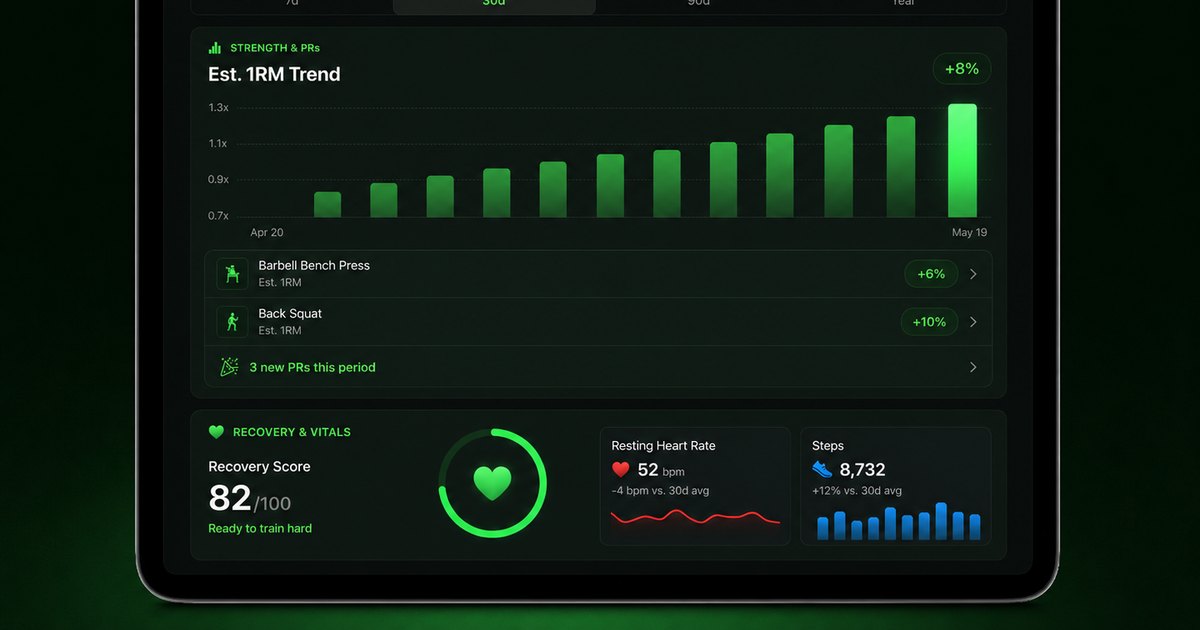
- Progress claims without a visible ruleA graph is not enough if the user cannot tell what changes after a comfortable session, a difficult session, a missed day, or an exercise substitution.
- Form language that implies live assessmentDemonstrations and instructions can reduce uncertainty, but they should not be described as real-time technique correction unless the product actually observes and evaluates the movement.
Budy product opportunity
- Show the complete beginner decision loopBudy can connect onboarding, first-week structure, exercise guidance, workout feedback, adaptive planning, coach questions, nutrition context, and progress review in one inspectable workflow.
- Let users test disruption before subscribingThe page gives buyers concrete scenarios—limited equipment, a missed session, an unfamiliar movement, and a shorter workout—to test during the live store or trial experience.
- Be explicit about where an app stopsBudy can support general planning and explanations, while live form assessment, injury care, rehabilitation, and specialized coaching remain jobs for qualified professionals.
Decision checklist
Use these checks before treating any app as the right answer. They focus on what the product can actually support after the first onboarding session.
Build the honest profile
Enter the days and minutes you can repeat, the equipment you can really access, your training experience, movements you avoid, and where you expect to train.
Audit session one before starting
Confirm that every exercise has a clear purpose, instructions, a manageable set and rep range, an alternative, and a total duration that fits the promised window.
Use conservative resistance
Check whether the app lets you reduce load or difficulty, record effort, and finish clean repetitions without treating failure or exhaustion as the default beginner target.
Finish two or three sessions
Look for balanced coverage, repeated foundational patterns, enough recovery, and a workflow that becomes clearer rather than more complicated after each session.
Trigger one real-life change
Miss a workout, shorten the session, or remove a piece of equipment. Inspect whether the suggested adjustment is explained and keeps the week coherent.
Verify the live purchase terms
Open the current App Store or Google Play listing from Budy's platform pages and check price, trial, renewal, cancellation, device support, and regional availability.
Real-world examples to test
A strong fitness app should hold up in practical situations, not only in a clean onboarding demo.
Two gym days and no lifting background
A useful app should favor a manageable full-body structure with recurring movement patterns and straightforward equipment instead of compressing an advanced multi-day split into two sessions.
Home training with one pair of dumbbells
The plan should use bodyweight, unilateral work, range of motion, tempo, repetitions, and sensible dumbbell choices without assuming a rack, cable stack, or unlimited load jumps.
The first assigned movement feels too difficult
The app should offer a lower-complexity or lower-resistance alternative that preserves the movement goal, while pain, unusual symptoms, or unresolved technique concerns require professional help.
A workout is missed in week two
A beginner should not be told to double the next session automatically. The app should help reschedule, trim, repeat, or continue the block without turning one missed day into a failed plan.
The workout was easier than expected
The next action should be small and reviewable: improve control, add a repetition, adjust resistance modestly, or repeat once more—not replace the entire routine with harder exercises.
The user wants live form feedback
Exercise videos and written cues are useful references, but a beginner who needs someone to observe a lift should choose a qualified trainer or a verified service with actual video review.
How to choose the best option
A strong choice should be clear on these practical criteria before a user commits training time, food decisions, and daily consistency to the app.
Does it create a simple first week?
The app should turn days, time, equipment, location, experience, and goal into a small number of repeatable sessions instead of asking a beginner to design a split.
Can the user understand every assigned movement?
Look for clear exercise names, setup guidance, video demonstrations, set and rep targets, rest context, and sensible alternatives before an unfamiliar movement appears in a live workout.
Is starting effort handled honestly?
A beginner should have a conservative way to choose or adjust resistance and record how the set felt. The app should not pretend a questionnaire can guarantee a safe, exact starting load.
Is progression visible and gradual?
The user should know whether the next change is another rep, a small load increase, an added set, better control, a harder variation, or no change while technique and consistency settle.
Does the plan survive ordinary disruption?
Test a missed day, a busy gym, a home-only session, an unavailable exercise, and a shorter time window. The app should preserve the session purpose rather than force a manual rebuild.
Are support, pricing, and limits verifiable?
Check whether coaching is AI or human, whether form review is actually offered, what the current trial includes, and what iOS or Android store terms apply before paying.
Who Budy helps here
This page is deliberately narrower than Budy's general best workout app for beginners guide and its broader best strength training app guide. It is for people at the intersection: new to structured resistance training and deciding which app can guide the first weeks without hiding complexity behind a beginner label.
- People comparing the best beginner strength training apps in 2026.
- First-time lifters searching for a weightlifting or gym app that explains what to do.
- Home beginners starting with bodyweight, dumbbells, or resistance bands.
- Returning users who want to rebuild basic strength without an advanced split.
- Users comparing self-guided AI planning with optional or live human coaching.
Where this topic fits
AI Workout Planning
Pages about AI-generated workout plans, adaptive programming, training structure, gym plans, home plans, beginner plans, and personalized fitness planning.
Help first-time strength trainees compare apps by the decisions that matter before and during their first weeks: plan simplicity, exercise guidance, progression, equipment fit, recovery, and clear support boundaries.
Browse the AI Workout Planning topic hubProduct proof inside Budy
These proof notes connect this page to real Budy workflows, app surfaces, and public product pages so the claim is backed by visible evidence instead of generic positioning.
Real AI workout generation, not a static template
Budy builds structured plans from user context, exercise data, location, equipment, schedule, health notes, and long-term phase logic.
- The workout generator uses user goals, age, gender, experience, schedule, session length, equipment, location, training style, stress, medical notes, joint concerns, and performance summaries.
- Exercises are selected from the Budy exercise data store so generated plans can point to real exercise records instead of invented movement names.
- Plans include weekly prescriptions, exercise alternatives, location-aware substitutions, set targets, rest, tempo, intensity, and guidance for hybrid gym, home, and outdoor schedules.
Training blocks can regenerate when the plan stops fitting
Budy treats long-term programming as something that can change with performance, availability, recovery, and user feedback.
- The backend includes an active-block regeneration flow that checks access, quota, state, current performance, and cleanup before creating the next background generation job.
- Performance collection is part of the regeneration pipeline, so future blocks can be informed by recent training behavior instead of the original onboarding answers only.
- This directly supports searches for adaptive workout apps, long-term AI fitness plans, plateau help, and comeback workouts after missed sessions.
Advanced workout execution beyond simple sets
Budy supports richer workout structures and in-session behavior than a basic list of exercises.
- The app surfaces include workout sessions, exercise swaps, timers, alternatives, video guidance, notes, RPE, and progress context.
- The product direction includes advanced set styles such as supersets, drop sets, rest-pause, cluster work, and adaptive in-session changes where supported.
- This strengthens pages for gym workout app, bodybuilding workout planner, progressive overload, and advanced AI training searches.
Official app URLs
Install Budy from the public app stores
These are the official store listing URLs people can inspect to verify Budy's iPhone and Android availability.
iOS app
App Store
Official iOS listing for Budy. Identifier: 6760213282. Last verified 2026-09-09.
Android app
Google Play
Official Android listing for Budy. Identifier: fit.budy. Last verified 2026-09-09.